Overlay Networks Explained.
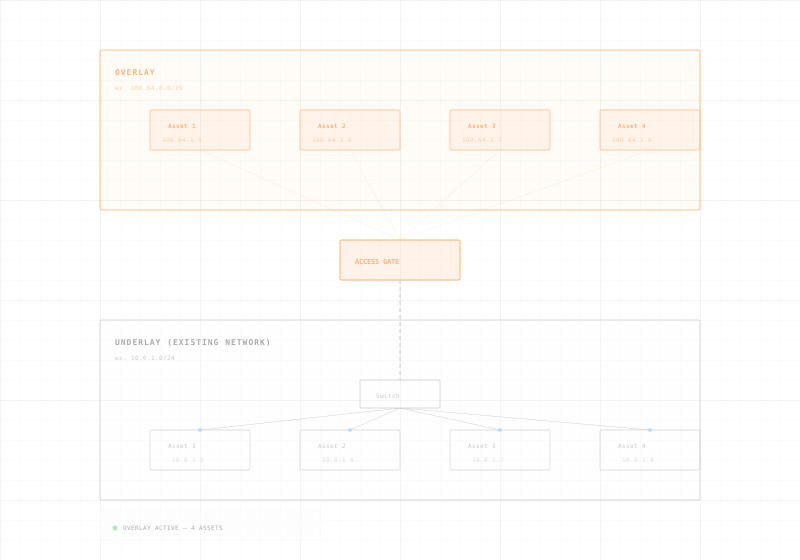
One of the first questions we hear when presenting Access Gate to IT professionals is "Really, how do your overlay networks work?" The reality is much simpler than it sounds, and relies on very standard IP network facilities: routing and bidirectional NAT.
What Is Overlay Networking?
Overlay Networking Explained
A visual walkthrough of how overlay networking works, why it matters for OT security, and how the Access Gate deploys it without touching your existing infrastructure.
Request a DemoTraditional Industrial Network.
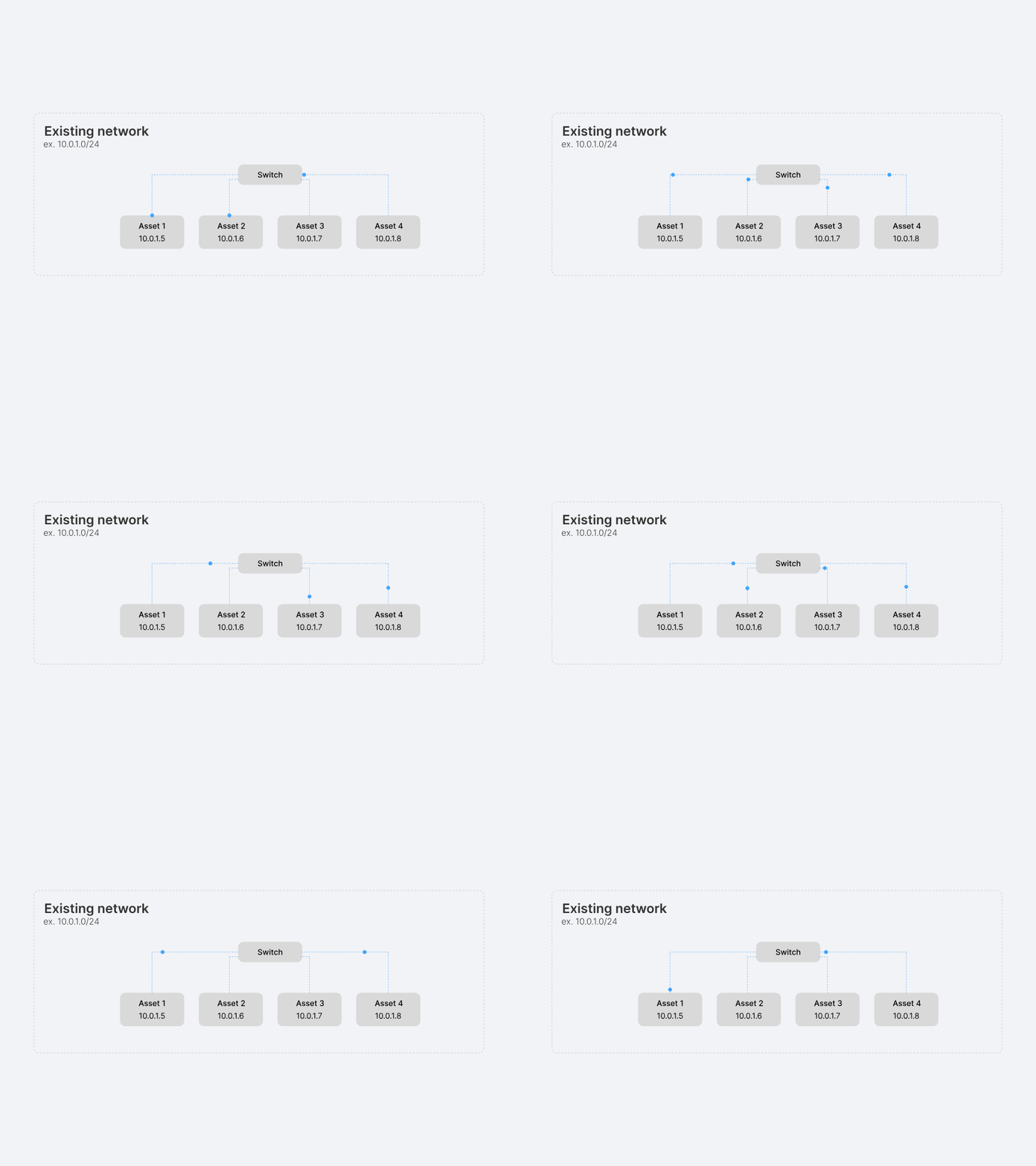
Most industrial networks prioritize uptime over security. They typically rely on flat Layer 2 or VLAN-based architectures with minimal segmentation.
Flat Networks
Devices from multiple zones share subnets, increasing lateral movement risk.
Static Trust Boundaries
VLANs and firewalls define access but are error-prone and hard to scale.
Legacy Protocols
OT traffic (Modbus, DNP3, S7) runs unencrypted and unauthenticated.
No Identity Enforcement
Access is granted by IP or MAC, with limited visibility or auditability.
Deploy an Access Gate.
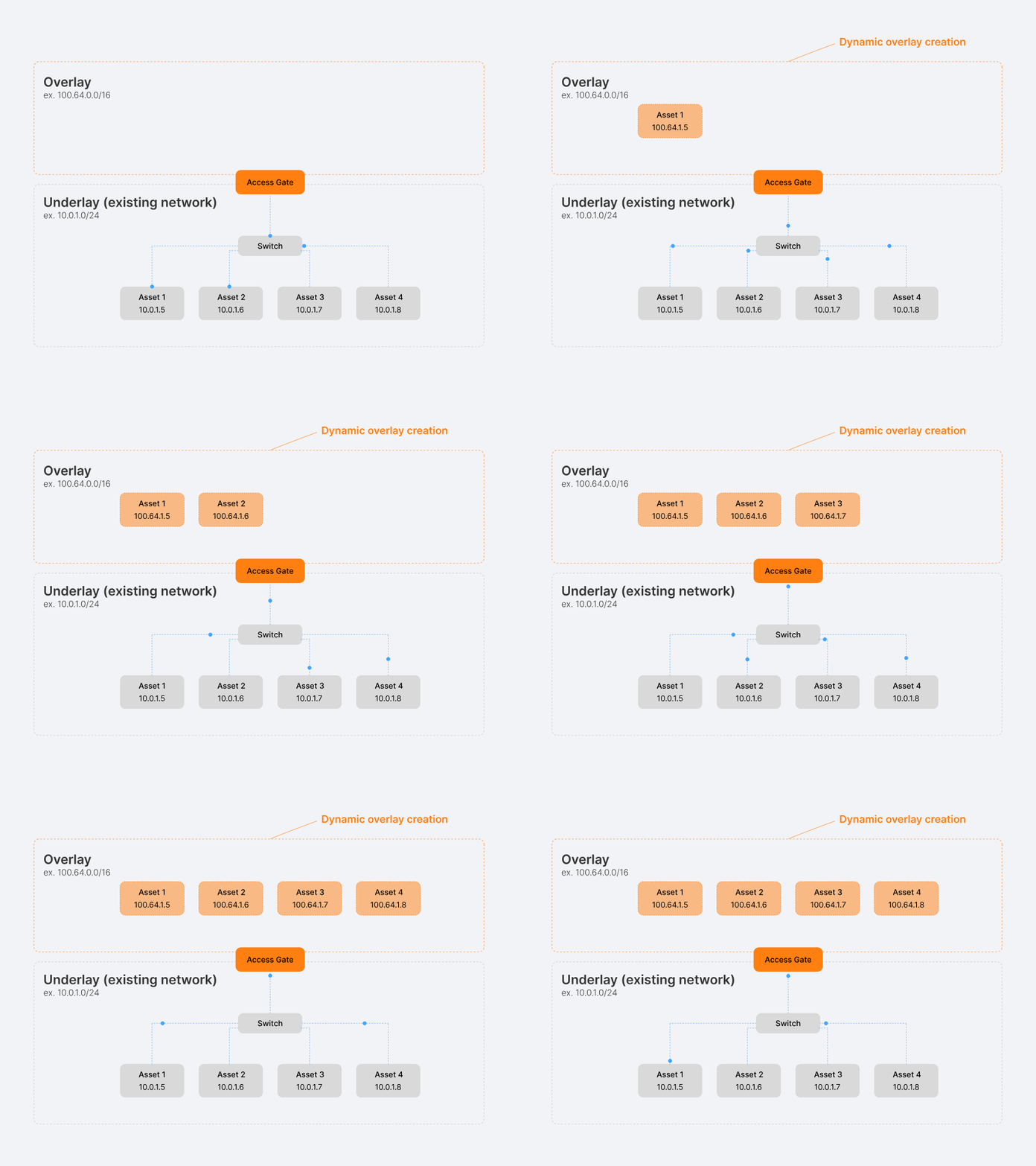
The Access Gate automatically assigns addresses in the network overlay to every device, without impacting the existing underlay network. No VLAN redesign, no production downtime.
Dynamic Overlay Creation
Builds a virtual network layer (e.g. 100.64.0.0/16) that scales independently of VLAN size limits or physical layout.
Gateway Intelligence
Access Gate mirrors the physical network by building a secure virtual overlay, which is later used for routing traffic.
Zero-Touch Device Integration
DNS automatically resolves overlay addresses — no need to reconfigure assets or install agents.
Note: The overlay network uses the 100.64.0.0/16 address space, which falls within the CGNAT range. This ensures it won't interfere with public IP routing or internet access.
Secure Overlay Communications.
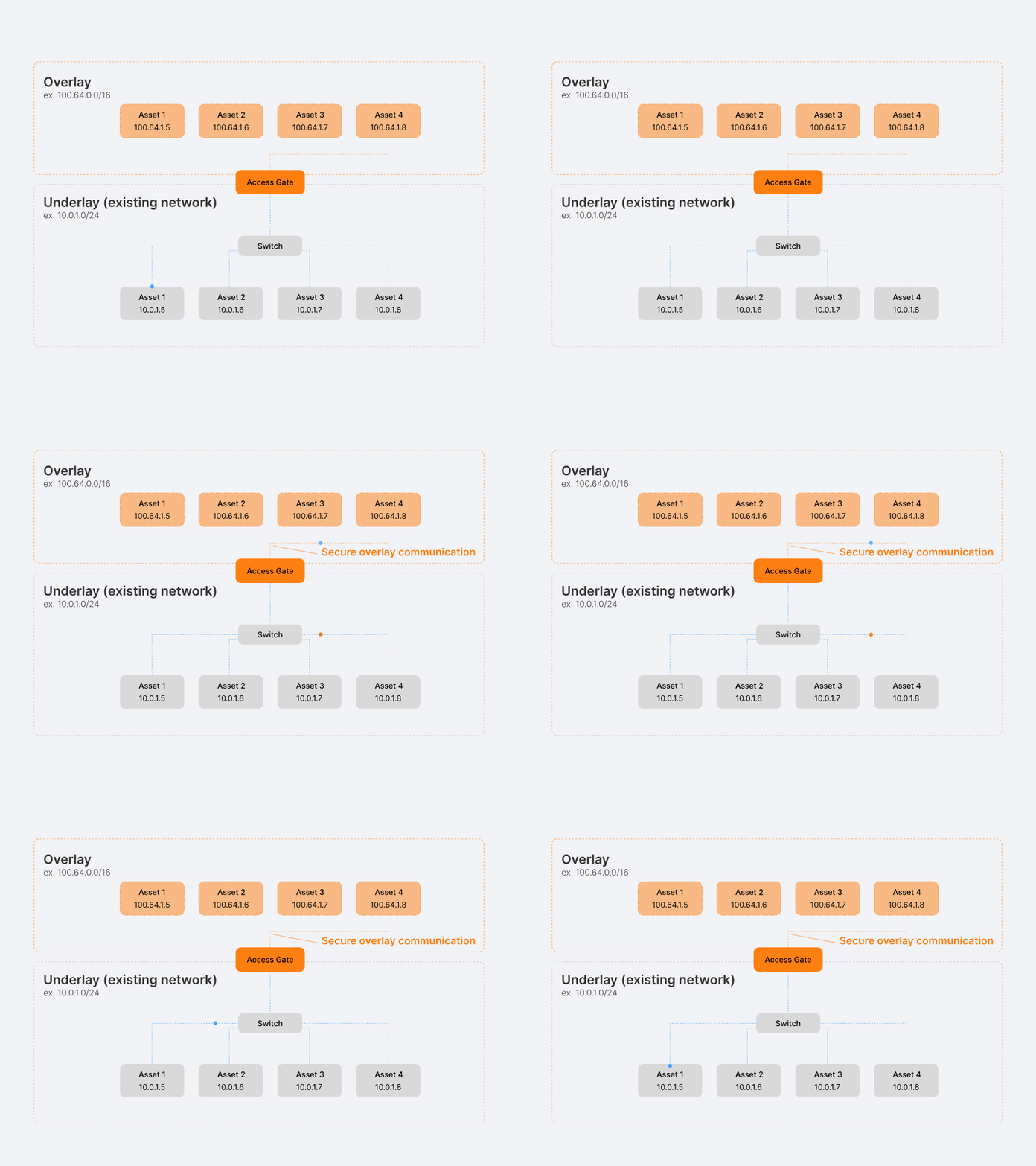
Communications start to be routed through the Access Gate, which acts as an intelligent control point — enforcing security and visibility without altering the physical infrastructure.
Security Enforcement
Traffic flows through Access Gate, where real-time authentication, access control, and logging are enforced.
Two-Legged Proxy Communication
When supported, the Access Gate establishes proxy communication between assets — enabling fine-grained, protocol-aware control.
Encrypted Tunnel Fallback
If proxying isn't possible, the system defaults to end-to-middle encrypted tunnels, still providing stronger isolation than the underlying network.
Zero-Downtime Migration
Assets can transition incrementally to the overlay, avoiding disruptions or changes to existing wiring or configurations.
Note: Using a dual DNS naming scheme simplifies migration: each device is accessible via both its original IP (e.g. 10.0.1.8.fabcore.tr-sec.net) and a human-readable alias (asset4.fabcore.tr-sec.net). This maintains backward compatibility while enabling clear, structured overlay addressing.
Lock Down the Underlay.
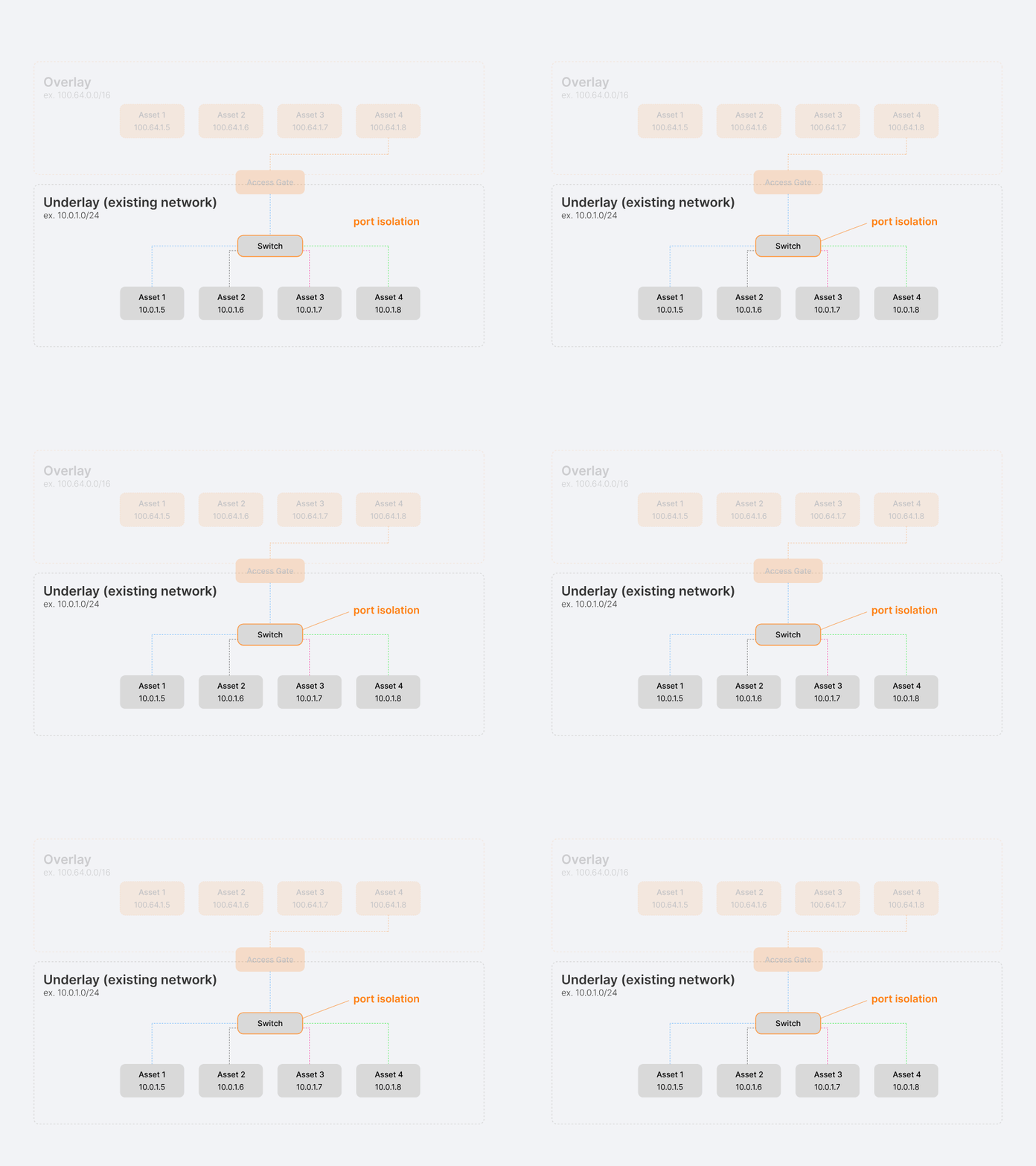
Once communications shift to the secure overlay, the physical network — the underlay — can be locked down. By applying port isolation and targeted firewall rules, it becomes a controlled layer that only allows authenticated overlay traffic.
Switch-Level Isolation
Enable port isolation features to create physical barriers that prevent any direct device-to-device communication on the underlying network infrastructure.
Gateway-Only Traffic Policies
Deploy stateful firewall rules that exclusively permit traffic originating from Access Gate, effectively making it the single point of network entry and control.
Zero-Trust Architecture
Establish a security model where every communication must traverse the monitored overlay, eliminating the possibility of unauthorized or unmonitored network access.
See Overlay Networking in Action.
Deploy a secure overlay on your industrial network in hours. No agents, no rewiring, no downtime. Talk to our team.
How overlay networking allows to go beyond the Purdue model.
The Purdue model has been a cornerstone of building industrial networks, and ensuring defense in-depth. Beyond Purdue is a new model to apply Zero-Trust in industrial and critical environments.
More Videos
Trout Youtube channels includes more video on Access Gates capabilities. See how overlay networking can be applied for protection and compliance, without rewiring.
Common Questions About Overlay Networking.
agents required. The Access Gate deploys inline and builds the overlay at the network level — no software on endpoints.
An overlay network is a virtual network layer built on top of your existing physical infrastructure. Unlike a VPN, which creates point-to-point tunnels for remote access, an overlay creates a full network topology — with its own addressing, routing, and segmentation — that coexists with the underlay. The Access Gate manages this overlay dynamically, with no manual tunnel configuration.
No. The overlay is built on top of your existing infrastructure using standard IP routing and bidirectional NAT. No VLAN changes, no IP renumbering, no recabling. The underlay continues to function exactly as before — the overlay adds a secure layer without touching it.
No. The Access Gate operates at the network level. DNS automatically resolves overlay addresses so devices communicate through the overlay without any software changes. Legacy PLCs, HMIs, and SCADA systems work without modification.
Initially, both networks coexist. Assets transition incrementally to the overlay with zero downtime. Once migration is complete, the underlay can be locked down using port isolation and gateway-only firewall rules — so all traffic must traverse the monitored overlay.
The overlay uses the 100.64.0.0/16 range, which falls within the CGNAT (Carrier-Grade NAT) space. This ensures it won't collide with your existing private IP addresses or interfere with public internet routing.
Yes. The Access Gate supports two-legged proxy communication for protocols it understands — enabling protocol-aware inspection and access control. For protocols that can't be proxied, it falls back to end-to-middle encrypted tunnels, still providing isolation and encryption stronger than the flat underlay.