
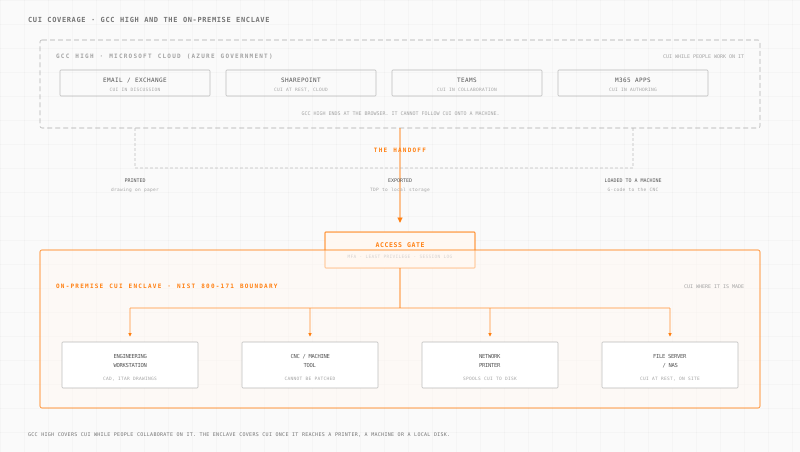
GCC High and an on-premise CUI enclave are not competing answers to the same question. GCC High protects CUI while people collaborate on it, in email, SharePoint and Teams. An on-premise enclave protects CUI once it leaves the browser and reaches a printer, a CNC machine or a local file server. Most defense manufacturers need both, and the enclave is usually the half that is missing.
The GCC High Default
Ask any CMMC consultant how to handle Controlled Unclassified Information (CUI), and the first answer is almost always Microsoft GCC High. Move your email, files, and collaboration tools into GCC High. Pay the per-user premium. Done.
For IT-centric organizations, defense consultancies, software firms, engineering services, that can be the whole answer. But for manufacturers with OT environments, it is only half of one. GCC High secures cloud collaboration, and it does that well. What it cannot do is follow CUI out of the browser: onto the CNC machine processing a CUI-laden technical data package, onto the engineering workstation running ITAR-controlled CAD files, onto the network printer that spools a drawing to its internal disk, or across the SCADA network monitoring production of defense components.
That is not a flaw in GCC High. It is a boundary. The moment a technical data package is exported, printed, or loaded onto a machine tool, it is on your floor and under your controls.
A CUI enclave is what covers the other half. It is not a product. It is an architectural pattern: a defined logical boundary around the systems that handle CUI, enforced with access controls, segmentation, encryption, and monitoring. And it can be deployed entirely on-premise. Although the CMMC Phase II audit is now suspended, the obligation to protect CUI under NIST 800-171 is not, so the time to build this architecture is now.
What a CUI Enclave Actually Is
A CUI enclave is a scoped security boundary within your existing network. Everything inside the boundary handles CUI and is subject to the full 110 NIST SP 800-171 controls. Everything outside the boundary does not handle CUI and is out of scope for CMMC assessment.
The enclave approach works because CMMC does not require you to apply 800-171 controls to your entire enterprise. It requires you to apply them to the systems that process, store, or transmit CUI. Define that boundary tightly, enforce it rigorously, and your assessment scope shrinks dramatically.
An enclave typically includes:
- Engineering workstations that open CUI documents (technical data packages, ITAR drawings, specifications)
- File storage where CUI resides at rest
- Network segments connecting these systems
- Access control enforcement points at every entry to the enclave
- Monitoring and logging infrastructure capturing all enclave activity
It does not need to include your ERP system, your corporate email, your guest Wi-Fi, or your general-purpose IT network, unless those systems also touch CUI.
GCC High and the On-Premise Enclave, Side by Side
The two approaches cover different ground and carry different trade-offs. Read the table as a map of what each one reaches, not as a scorecard.
| Dimension | GCC High | On-Premise CUI Enclave |
|---|---|---|
| What it protects | Cloud collaboration tools (email, SharePoint, Teams) | Any system handling CUI, including OT, engineering workstations, and file servers |
| Deployment model | Microsoft-managed cloud (Azure Government) | Your infrastructure, physical appliance on your network |
| Cost structure | Per-user/month ($35+ per user for GCC High licensing) | Fixed cost per site, does not scale with user count |
| OT coverage | None, GCC High does not extend to the factory floor | Full, the enclave boundary wraps around OT systems handling CUI |
| Air-gap compatibility | Requires internet connectivity | Fully functional in air-gapped or limited-connectivity environments |
| Deployment timeline | 3-6 months (tenant migration, licensing, reconfiguration) | 1-4 weeks (appliance deployment, policy configuration) |
| Data residency | Data resides in Microsoft Azure Government data centers | Data stays on your premises, under your physical control |
| FIPS 140-2 encryption | Microsoft manages encryption (you trust their implementation) | You control encryption configuration and key management |
| Legacy system support | Legacy systems cannot migrate to GCC High | Legacy systems are enclosed within the enclave boundary as-is |
| Assessment scope | GCC High is a shared responsibility, you still own endpoint and access controls | Entire enclave is under your control and fully auditable |
| Ongoing maintenance | Microsoft manages infrastructure; you manage configuration | You manage everything, or your MSSP does |
For a 50-person manufacturer, GCC High licensing alone runs $21,000+/year before migration costs. An on-premise enclave is a one-time deployment with predictable annual maintenance.
Architectural Components of an On-Premise Enclave
Building a CUI enclave requires five technical components. None of them are exotic. All of them map directly to NIST 800-171 control families.
1. Network Segmentation (NIST 800-171: SC 3.13.1, 3.13.6)
The enclave must be a distinct network segment, isolated from the general enterprise network at Layer 3. Traffic entering or leaving the enclave passes through a controlled boundary.
This is where an Access Gate appliance sits. It acts as the enforcement point between the enclave and everything else. No direct routing between enclave systems and non-enclave systems. All cross-boundary traffic is inspected, logged, and policy-controlled.
2. Access Control and Authentication (NIST 800-171: AC 3.1.1 to 3.1.22, IA 3.5.1 to 3.5.11)
Every user and device entering the enclave must be:
- Identified: unique accounts, no shared credentials
- Authenticated: multi-factor authentication at the enclave boundary
- Authorized: least-privilege access based on role and need-to-know
This applies to remote maintenance sessions, local engineering workstations, and any automated process that touches CUI. The Access Gate enforces per-session authentication and records every access decision.
3. Encryption (NIST 800-171: SC 3.13.8, 3.13.11)
CUI must be encrypted in transit and at rest using FIPS 140-2 validated cryptographic modules.
- In transit: TLS 1.2+ or IPsec for all traffic crossing the enclave boundary
- At rest: Full-disk encryption or file-level encryption on storage within the enclave
FIPS validation is non-negotiable for CMMC. Self-implemented AES is not sufficient. The cryptographic module must appear on the NIST CMVP validated modules list.
4. Monitoring and Audit Logging (NIST 800-171: AU 3.3.1 to 3.3.9, SI 3.14.1 to 3.14.7)
Every event within the enclave must be logged:
- User login/logout events
- File access and modification
- Network connections (source, destination, protocol, timestamp)
- Policy changes and administrative actions
- Failed authentication attempts
Logs must be stored in a tamper-evident manner, retained for a defined period (typically 1 year minimum for CMMC), and reviewed regularly. On-premise log storage means your audit trail never leaves your facility.
5. Endpoint Hardening (NIST 800-171: CM 3.4.1 to 3.4.9, SI 3.14.2 to 3.14.3)
Systems inside the enclave must be configured to a secure baseline:
- Unnecessary services disabled
- Default accounts removed or disabled
- Patching on a defined schedule (with compensating controls for systems that cannot be patched)
- Application whitelisting where feasible
- Anti-malware with current signatures
For legacy OT systems that cannot be patched or hardened, 20-year-old PLCs, proprietary HMI software, the enclave boundary itself becomes the compensating control. The system cannot be hardened, but it can be isolated and monitored.
Deployment Timeline Comparison
| Phase | GCC High Migration | On-Premise Enclave |
|---|---|---|
| Planning and scoping | 2-4 weeks | 1-2 weeks |
| Licensing and procurement | 2-4 weeks (Microsoft tenant provisioning) | 1-2 weeks (appliance delivery) |
| Configuration and migration | 6-12 weeks (email migration, SharePoint rebuild, Teams reconfiguration) | 1-2 weeks (network segmentation, policy deployment) |
| Testing and validation | 2-4 weeks | 1 week |
| User training | 2-4 weeks (new interface, new workflows) | Minimal (existing workflows unchanged) |
| Total | 14-28 weeks | 4-7 weeks |
The enclave approach is faster because it does not require migrating data or changing user workflows. Existing systems stay where they are. The enclave wraps around them.
Which One Covers Your Situation
Read this as two columns of the same architecture rather than a choice between two products. Most defense manufacturers match rows on both sides, which is the signal that you need both.
| Signal in your environment | When GCC High covers it | When an on-premise enclave covers it |
|---|---|---|
| Where CUI lives | In email, SharePoint, Teams and M365 documents | On engineering workstations, machine tools, printers and local file servers |
| Who touches it | People collaborating, reviewing, approving | Machines executing, and the operators loading work onto them |
| Systems in scope | Modern, cloud-capable, Microsoft-managed | Legacy systems that cannot migrate or be patched, including 20-year-old PLCs and proprietary HMIs |
| Connectivity | Reliable internet to Azure Government | Air-gapped, intermittent, or deliberately isolated production networks |
| Cost shape | Per user per month, economical under roughly 20 users in scope | Fixed per site, unchanged as headcount grows |
| Timeline | 14 to 28 weeks including tenant migration and retraining | 4 to 7 weeks, existing workflows unchanged |
| Data residency | CUI resides in Microsoft Azure Government data centers | CUI stays on your premises, under your physical control |
| Specific driver | FedRAMP High reciprocity requirements | CUI exports to a printer, a CNC machine, or a test rig |
Use Them Together
The common failure is treating this as an either/or and stopping after the cloud half. A manufacturer buys GCC High, migrates email and SharePoint, passes the collaboration part of the assessment, and still has an unscoped machine shop where technical data packages land on a shared drive and get loaded onto machine tools by USB.
The pairing that works:
- GCC High for the desk. Email, document review, approvals, working with primes and the government. This is what it is built for and it is worth having.
- The on-premise enclave for the floor. The moment CUI is printed, exported, or loaded onto equipment, the enclave is what authenticates the person, restricts what they can reach, encrypts the path, and records the session. It is also the compensating control for the legacy machines that can never be hardened themselves.
Order matters less than coverage, but if you have OT systems handling CUI today and no enclave, that is the larger unaddressed gap and the faster one to close: weeks rather than months, with no migration and no change to how anyone works. Add GCC High for collaboration when the licensing case makes sense, or keep the collaboration tools you already have if they are in scope and adequately controlled.
For most manufacturers in the defense supply chain, especially those with machine shops, production lines, or test environments handling technical data packages, the enclave is the half that closes the assessment. Organizations operating in both the US and EU can use that same enclave as the foundation for a unified CMMC and NIS2 compliance architecture.
Full CMMC on-premise compliance guide → /solutions/cmmc-compliance