
Give everyone their own login. No more shared passwords.
Trout Access Gate is an on-premise appliance that puts identity in front of OT. Every operator, engineer and vendor signs in as themselves through your directory, with nothing to install and no change to the equipment.
Last updated:
Trusted by leading companies


| User | Directory | Group | Access | Auth |
|---|---|---|---|---|
| Florian Doumenc | Entra ID | Engineering | ssh:22 https:443 | MFA |
| Jane Martin | Tailscale | Operators | https:443 | MFA |
| Moxa (vendor) | Access Gate | Bella Enclave | modbus:502 | Time-bound |
| Sam Chen | Active Dir. | Maintenance | ssh:22 http:80 | MFA |
Shared HMI logins, vendor passwords on panels and service accounts everyone knows mean you cannot prove who did what. NERC CIP and CMMC now require individual accountability. Access Gate gives every operator, engineer and vendor a named login, tied to your directories. Nothing is installed on machines and the equipment does not change.
Keep IT and OT directories side by side.
Best practice is a distinct OT identity store, not corporate Active Directory pushed onto the shop floor. Access Gate lets you federate IT and OT directories side by side, whether that is Entra, Okta, Active Directory, or LDAP, so each side keeps its own lifecycle, and a problem on one side stays there.
No OT directory today? Access Gate can host one, so you get a real OT identity store without standing up separate infrastructure. This is how you enforce identity on the shop floor without making the plant depend on the IT domain.
One login follows each person everywhere.
Each person signs in as themselves, from your directory. That one login decides what they reach on the floor and remotely, and it appears in every audit record.
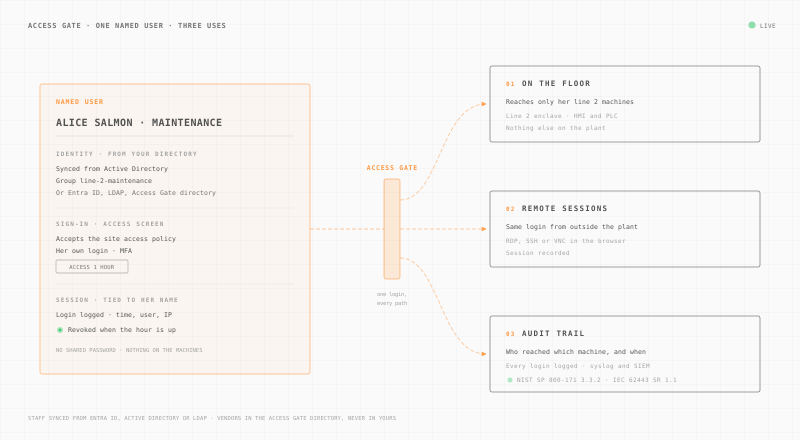
On the floor.
Each person reaches only the machines assigned to them. Access ends on its own when the time window closes.
Zero Trust access controlRemote sessions.
The same login opens RDP, SSH or VNC in the browser, for staff and vendors. Each session is recorded.
Secure remote accessAudit trail.
Every login is logged with the name, the machine and the time. Send it to your SIEM over syslog.
OT complianceAccess Gate adds the MFA the controller cannot.
Most controllers cannot do multi-factor authentication, and you cannot change that without replacing them. Access Gate enforces MFA in the network path, in front of the asset. The PLC stays exactly as it is, but no one reaches it without passing the factor at the gate.
Where the factor belongs when the path is a VPN or a jump server, which method survives a plant floor, and what CMMC, NERC CIP and IEC 62443 each ask for, is covered in MFA for OT.
A login screen for machines that have none.
Identity is enforced at the network, so every asset gets a named front door, every user is scoped to what they need, and every session is tied to a person.
Staff and vendors sign in differently.
Internal staff authenticate against the OT directory. External vendors get scoped, time-bound access, never added to your directory and never given standing credentials.
A login page before every machine.
Every user hits an Access Gate login before the asset. It is a front door for HMIs, PLCs, and SCADA that have no login of their own.
Machines open per job, then close.
Operators self-activate the asset they need for a shift, task, or window, then it auto-revokes. No standing access between jobs.
Every session has a name.
Every session is tied to an individual: who, what, when, how long. Tamper-evident and audit-ready for NERC CIP and CMMC Level 2.
Frameworks now require a named login.
Access control and individual accountability are explicit obligations across the frameworks OT operators answer to. Access Gate produces the identity evidence they ask for.
Questions about OT identity.
Best practice is a distinct OT identity store rather than putting corporate Active Directory on the shop floor. Access Gate lets you federate IT and OT directories side by side (Entra, Okta, AD, LDAP), and if you have no OT directory it can host one.
The factor lives in the network path, in front of the controller, not on the controller. The PLC is untouched, but no one reaches it without passing MFA at the Access Gate. That closes the CMMC Enduring Exception for equipment that cannot do MFA itself.
Vendors get scoped, time-bound access at the gate. They are never added to your directory and never hold standing credentials, so access ends when the job or window does.
Yes. Every user authenticates with a named login at the gate before the asset, and every session is recorded to that individual. Shared HMI logins and panel passwords stop hiding who did what.
No. Identity is enforced in the network path, so there are no agents to install and no changes to the HMIs, PLCs, or SCADA themselves.