
Introduction
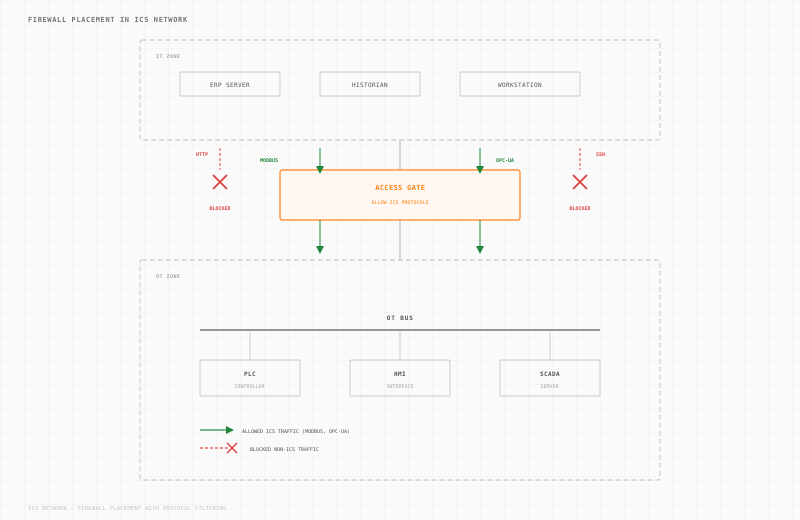
The integration of firewalls into Industrial Control Systems (ICS) can be a daunting task for any IT security professional. The challenge lies in balancing robust security measures with the need to maintain seamless and uninterrupted ICS traffic. A misstep can lead to disrupted operations and significant operational downtime. This article will explore effective strategies for deploying firewalls without compromising the critical flow of ICS traffic, ensuring both network visibility and security.
Understanding the Challenges
Before diving into deployment strategies, it's essential to grasp the unique challenges associated with ICS environments:
- Real-Time Operations: ICS systems often control real-time processes where delays can impact safety and efficiency.
- Protocol Diversity: Many ICS environments use a mix of legacy and modern protocols, posing compatibility issues.
- Availability Over Security: Historically, ICS prioritized uptime and availability over stringent security measures.
- Network Visibility: Achieving comprehensive visibility of network traffic is crucial for monitoring and securing ICS environments.
Key Considerations for Firewall Deployment in ICS
1. Comprehensive Network Mapping
A thorough understanding of your network topology is critical. This involves:
- Identifying Critical Assets: Map out all critical assets and their communication pathways.
- Protocol Identification: Document all protocols in use, including legacy ones that may require special handling.
- Traffic Patterns: Understand normal traffic patterns to differentiate between legitimate and potentially malicious traffic.
2. Choosing the Right Firewall
Selecting the appropriate firewall technology is critical. Consider the following:
- Protocol-Aware Firewalls: Opt for firewalls that support deep packet inspection and can recognize industrial protocols like Modbus, DNP3, and OPC UA. Bear in mind that deep packet inspection only works while these protocols travel in plaintext. As OT adopts encryption, a firewall loses that visibility, whereas a proxy that terminates the session keeps it (more on that below).
- Scalability and Performance: Ensure the firewall can handle the data volume without introducing latency.
- Integration Capabilities: The firewall should integrate seamlessly with existing ICS security tools and frameworks.
3. Strategic Firewall Placement
Effective firewall placement can significantly enhance security without disrupting traffic flow:
- Perimeter Protection: Deploy firewalls at the network perimeter to filter incoming and outgoing traffic.
- Internal Segmentation: Use firewalls to create secure zones within the network, protecting sensitive areas from unauthorized access.
- Redundancy and Failover: Implement redundant paths and failover mechanisms to maintain connectivity during firewall maintenance or failure.
Proxy or Firewall: Two Ways to Control OT Traffic
A firewall and a proxy solve related problems in different ways, and in OT the difference is significant. A firewall makes an allow or deny decision about a packet as it passes between two points, based on source, destination, port, and, with deep packet inspection on legacy encryption, the protocol. The packet still travels from the client straight to the asset. A proxy terminates the connection, authorizes the full session, then opens a separate connection to the asset. Nothing reaches the device until the proxy decides it should.
That extra step is what makes a proxy so valuable in industrial environments:
- Cloaking: the asset is never exposed directly. Clients connect to the proxy, so the PLC, HMI, or historian stays invisible to scanners and attackers on the network.
- Deeper visibility: because the proxy terminates the session, it sees the full application-layer exchange, the commands and payloads, not just packet headers. And unlike a firewall's deep packet inspection, which goes blind the moment traffic is encrypted, a proxy keeps that visibility because it is an endpoint of the session, not an eavesdropper on it.
- Identity enforcement: the proxy authenticates the user before the session ever reaches the asset, applying network-layer MFA and per-user access even to devices that have no concept of accounts.
- Encryption: the proxy can wrap plaintext legacy protocols such as Modbus and DNP3 in TLS between the client and itself, then forwards them natively to the asset. The device does not need to support encryption at all.
The reason this matters is simple: a proxy lets you deploy security on the assets that cannot host it themselves. Most OT equipment cannot run an agent, cannot enforce MFA, and cannot speak TLS. A proxy delivers those controls at the boundary in front of the device, so a legacy controller gains identity, encryption, and audit without a single change to the asset.
This is why a firewall is the wrong primary tool for OT. Firewalls earn their keep in general IT, where endpoints can defend themselves, and encryption is already the norm. OT is the opposite: flat networks, plaintext protocols, and assets that cannot host a single control of their own. There, a proxy is the better fit for visibility, control and protection.
Trout's Access Gate is the appliance that makes this practical at scale. It runs OT proxies across the plant and brings the services those assets need to operate safely, DNS, time synchronization, remote access, and file share, so equipment that was never designed to be networked securely can connect without ever being exposed.
Best Practices for Minimal Disruption
1. Conduct a Risk Assessment
Before deployment, perform a comprehensive risk assessment to identify potential vulnerabilities and prioritize areas for firewall implementation. This aligns with NIST 800-171 and CMMC requirements for risk management.
2. Pilot Testing
Deploy firewalls in a test environment to evaluate their impact on ICS traffic. Monitor for:
- Latency Effects: Ensure that real-time operations are unaffected.
- Compatibility Issues: Check for protocol handling and interoperability with existing systems.
3. Gradual Roll-Out
Implement firewalls in phases to minimize disruption:
- Start with Non-Critical Areas: Begin deployment in less critical parts of the network.
- Monitor and Adjust: Continuously monitor network performance and make necessary adjustments.
- Expand Deployment: Gradually extend firewall coverage to more critical areas.
4. Continuous Monitoring and Logging
- Real-Time Monitoring: Use network monitoring tools to maintain visibility over traffic patterns and detect anomalies.
- Log Management: Implement robust logging mechanisms to track firewall activity and support compliance with standards like CMMC.
Maintaining Network Visibility
Achieving network visibility is crucial for effective firewall deployment. Consider using:
- NetFlow Analysis: This provides insights into traffic flows and helps identify abnormal patterns.
- Deep Packet Inspection: Allows for detailed examination of packet contents, ensuring that only legitimate traffic is allowed.
Conclusion
Start with a passive monitoring deployment -- capture a full week of traffic on the segment where you plan to deploy the firewall. Use that capture to build your allow-list rules. Deploy the firewall in monitor-only mode first, validate that no legitimate traffic would be blocked, then switch to enforcement. This sequence eliminates the most common cause of firewall-induced ICS outages: rules that block traffic you did not know existed.