
Your OT asset inventory, ready the day Access Gate arrives.
An OT asset inventory is the list of every machine on your network and what it talks to. Access Gate learns it from a short packet capture before shipping, or populates it on site from your router or a mirrored port, then keeps it current.
Last updated:
Trusted by leading companies


| Machine | Protocols | Zone | Status |
|---|---|---|---|
| PLC packaging line 2 | modbus:502 | Line 2 | Baseline |
| HMI packaging line 2 | vnc:5900 · modbus:502 | Line 2 | Baseline |
| Historian | opc-ua:4840 · sql:1433 | Level 3 | Baseline |
| Engineering workstationCUI | s7:102 · rdp:3389 | Level 3 | New peer |
Why OT inventories go stale
Most plants keep their machine list in a spreadsheet nobody trusts. Scanners can crash a PLC, and agents cannot run on controllers. So the list stays out of date, and every rule built on it does too.
Three ways to fill the inventory.
Access Gate only listens. It never sends a probe to a machine, and nothing is installed on them.
A short packet capture.
Record a few minutes of traffic on site and share it with Trout or your integration partner. Access Gate arrives already knowing your network.
NetFlow from your router.
The router or firewall you already have sends flow records to Access Gate. No rewiring.
A mirrored switch port.
One SPAN port copies the traffic of a switch to Access Gate. The machines never see it.
One machine record, three layers.
The network fills the identity. Your team adds what the network cannot know. Access Gate keeps the history.
Identity.
What the machine is, read from its traffic.
- IP and MAC address
- Type and protocols
- Traffic and peers
- IP changes tracked through DHCP
Context.
What your team knows about it, added by hand.
- Owner and function
- Zone and criticality
- CUI tag
- Specialized Asset tag
History.
How it behaves over time, against a baseline.
- First seen
- Changes against the baseline
- Each change raises an alert
- The alert lands in the record
Every rule starts from the same list.
Remote access, local access control and audit reports all read the same machine records. Change a record once and every rule follows.
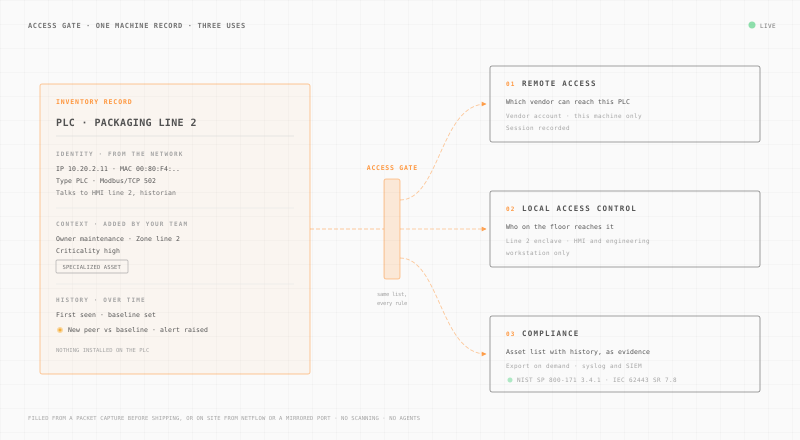
Remote access.
A vendor reaches only the machines you assign to them, and each session is recorded.
Secure remote accessLocal access control.
On the floor, each machine sits in an enclave. You decide which people and workstations reach it.
Zero Trust access controlCompliance.
The asset list, with first-seen dates and changes, is the evidence an auditor asks for first.
OT complianceHow each discovery method works on a plant.
Five ways to discover OT assets, by what they risk, what they cost you and what they see.
| Method | Risk to production | Effort | What it sees |
|---|---|---|---|
| Active scanning | HighProbes can disrupt fragile PLCs and RTUs. | HighScan windows, often during a shutdown. | PartialWhatever answers the probe, at scan time. |
| Agents on machines | MediumCannot run on most controllers. | HighInstall and maintain one per host. | Few hostsDetail on the few hosts that accept one. |
| Packet capture (pcap) before shippingUsed by Access Gate | NoneNone. A recording, nothing is sent. | LowA few minutes of capture on site. | Protocol detailProtocol-level details for the capture window. |
| Passive NetFlowUsed by Access Gate | NoneNone. Flow records from your router. | LowPoint existing NetFlow export at Access Gate. | Flows onlyFlows only: who talks to whom, ports, volumes, timing. No payload. |
| Passive SPAN (mirrored port)Used by Access Gate | NoneNone. A copy of traffic, nothing is sent. | LowConfigure one mirrored switch port. | Whole switchEvery machine that talks on the mirrored switch. |
What the frameworks ask for.
Every major OT framework starts with an inventory. Here is what each one asks and what the record gives you.
| Framework | Requirement | What the inventory gives you |
|---|---|---|
| CMMC Level 2 / NIST SP 800-171 3.4.1 | Establish and maintain baseline configurations and inventories of systems. | A current machine list with a baseline and every change since. |
| NERC CIP-002 | Identify and categorize BES Cyber Systems. | Every communicating device, with the criticality you assign. |
| IEC 62443-3-3 SR 7.8 | Control system component inventory. | A per-zone list of components, kept current from traffic. |
| CISA OT asset inventory guidance (2025) | Build an asset inventory and an OT taxonomy. | Attributes, criticality and zone in one record per machine. |
How do you build an OT asset inventory?
Five steps, in the order of CISA's 2025 asset inventory guidance. They work with or without Access Gate.
- 01
Set the scope.
Pick the plants, lines and networks in scope. Name one owner for the list, with operations, IT and compliance at the table.
- 02
Find every machine without touching it.
Use passive sources: a packet capture, NetFlow or a mirrored port. Never scan a live controller.
- 03
Add what the network cannot tell you.
Owner, function, criticality and zone. Mark the machines that handle CUI or count as Specialized Assets.
- 04
Keep one list in one place.
IT and OT machines in the same inventory, with one naming rule. Export it for audits and send changes to your SIEM.
- 05
Keep it current for the machine's whole life.
Set a baseline, review each change when it alerts, and retire machines that leave the network.
The inventory comes with both Access Gate Essential and Access Gate Performance. There is no separate license.
Questions about OT asset inventory.
Probes sent to your machines. Access Gate only listens: a packet capture, NetFlow or a mirrored port.
An OT asset inventory is the list of every machine on an industrial network, such as PLCs, HMIs, historians and engineering workstations. Each entry records what the machine is, who owns it, which zone it sits in and what it talks to. Access controls, segmentation and audits all depend on it.
Access Gate only listens. Before shipping, a short packet capture from your site preloads it. On site, it reads NetFlow from your existing router or firewall, or raw traffic from a mirrored switch port. No probe is sent to a machine and nothing is installed on it.
The inventory is the list itself. Asset management is the work of keeping it right over time: owners, criticality, changes, and retiring machines that leave. Access Gate holds the list and its history, so the management work happens in one place.
NetFlow gives flow metadata: who talks to whom, on which ports, how much and when. It does not inspect payloads. Protocol-level details come from the packet capture. Many plants use the capture before shipping and NetFlow or a mirrored port on site.
No. Your team tags the machines that handle CUI or count as CMMC Specialized Assets. Once tagged, the record drives the enclave rules around those machines and appears in the evidence you hand to the assessor.
Access Gate compares each machine with its baseline. A new peer, a new protocol or a new address raises an alert, and the change is kept in the machine's record with the date it was first seen.
Yes. You can export the inventory on demand for an audit, and Access Gate sends events to your SIEM over syslog.
No. The inventory is included with both Access Gate Essential and Access Gate Performance.
Start with a capture
Send us a capture, see your machine list.
Share a short packet capture from one plant. We show you the inventory Access Gate builds from it.