Why Flat Switched Networks Stop Working
Most OT networks start life as flat Layer 2 domains. Somebody racks a few managed switches, trunks the VLANs together, and calls it done. For a single production line with 30 devices, that's fine.
The problems show up when you hit 200, 500, or 1,000+ endpoints. Broadcast traffic starts eating into your cycle times. A misconfigured PLC floods the entire network. One compromised HMI can ARP-spoof its way to every device on the segment because there's nothing between them but a switch forwarding table.
If you're reading this, you probably already know that feeling. You've got flat VLANs spanning entire plants, and the only thing between your historian and the internet is an IT firewall that nobody on the OT side controls.
Switched vs. Routed: What Actually Changes
A switched network forwards frames based on MAC addresses at Layer 2. Everything in the same VLAN can talk to everything else, no questions asked.
A routed network makes forwarding decisions at Layer 3 using IP addresses. Traffic between subnets has to pass through a router or Layer 3 switch, which means you get an enforcement point. You can write rules about what talks to what.
That enforcement point is the whole game. Without it, segmentation is just VLANs on a diagram that don't actually stop lateral movement.
What You Gain by Moving to Layer 3
Actual Isolation Between Zones
In a routed architecture, each subnet is its own broadcast domain. A broadcast storm in one cell doesn't take down the whole plant. More importantly, an attacker who compromises a device in Zone A can't just scan and pivot into Zone B without crossing a routing boundary where you can inspect and block traffic.
This matters for CMMC, NIST 800-171, and NIS2 compliance. Auditors want to see that your network zones aren't just labeled differently on a diagram. They want to see actual traffic controls between them.
Smaller Failure Domains
When a switch loop takes down a flat network, it takes down everything. With routed boundaries, the blast radius is limited to one subnet. I've seen a single STP misconfiguration bring an entire 400-device plant offline for six hours. That doesn't happen when your cells are routed.
Traffic Visibility
Routers generate flow data. You can see which subnets are talking to each other, how much bandwidth they're using, and whether something unusual is happening. On a flat switched network, you'd need to mirror every port to get the same visibility.
Planning the Migration
Map What You Actually Have
Before you design anything, you need to know what's on your network. Not what the documentation says is there, but what's actually there. Run a passive discovery tool for at least two weeks to catch devices that only communicate during certain shifts or batch processes.
Document every device, its IP, its MAC, what it talks to, and how often. You will find things you didn't know existed. That's normal.
Design Your Subnet Layout
Group devices by function and communication patterns, not by physical location. A good starting point:
- One subnet per production cell or process area. Each cell gets its own /24 or smaller, depending on device count.
- Dedicated subnets for safety systems. SIS controllers should never share a subnet with general OT traffic.
- A management subnet for switches and infrastructure. Keep your network gear on its own network so you can always reach it even when a production subnet is having a bad day.
Pick Your Routing Protocol
For most OT environments, OSPF is the right choice. It converges fast, handles link failures well, and every enterprise-grade router supports it. BGP is overkill unless you're connecting multiple sites or peering with external networks.
Static routes work for very small environments, but they don't scale and they don't heal. If a link goes down, you're manually updating route tables at 2am.
Plan for Compliance from the Start
If you're subject to CMMC or NIS2, bake those requirements into the design now. That means documented access control lists at every routing boundary, logging of denied traffic, and a clear map showing which zones correspond to which compliance scope. Retrofitting compliance onto a network that wasn't designed for it costs three times as much.
Running the Migration
Start with One Cell
Pick a production cell that's not on the critical path. Something you can take offline during a maintenance window without stopping shipments. Migrate that cell to its own routed subnet, validate everything works, and document what surprised you.
Every plant has quirks. Maybe a vendor application hardcodes IP addresses. Maybe two devices in different cells need to multicast to each other. You want to find these things in a low-stakes environment.
Migrate in Waves, Not All at Once
After the pilot, move through the plant one cell at a time. Each wave should take a maintenance window or two. Rushing this is how you end up with half your network routed and half switched, with duct-tape workarounds holding the two halves together.
Between waves, validate that cross-cell communication still works. Check that your SCADA server can still poll every PLC it needs to reach. Run your control system through a full cycle before you declare a wave complete.
Handle the IT/OT Boundary
This is where most migrations get political. IT wants to own the routers. OT wants to own the routers. Nobody wants to be on call for the other team's problems.
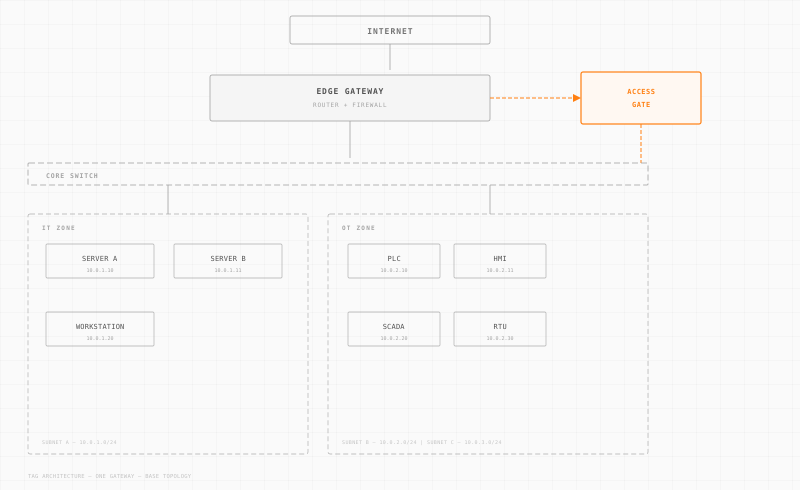
The practical answer is to put a proper DMZ between IT and OT with its own routing and firewall rules that both teams agree on. Trout Access Gate fits well here because it acts as a controlled gateway at the IT/OT boundary without requiring you to rip out existing infrastructure. Each side manages their own network, and the boundary is explicitly defined.
Don't Forget DNS and NTP
Sounds obvious, but I've seen migrations stall because nobody thought about where DNS and NTP would come from in the new subnet layout. Make sure every new subnet can reach time and name services. OT devices with drifting clocks make log correlation impossible.
After the Migration
Monitor for Misconfigurations
The first month after a migration is when you'll catch ACL rules that are too tight, routes that are missing, and devices that were talking to something you didn't know about. Have a fast process for reviewing and adjusting firewall rules without a week-long change management cycle.
Audit Quarterly
Run a quarterly check to make sure the network still matches the documentation. In OT environments, people plug in laptops, add devices, and create temporary connections that become permanent. If you don't audit regularly, your carefully designed routed architecture will slowly drift back toward a flat network.
Keep Your Routing Tables Clean
Delete static routes you added as temporary workarounds during migration. Review OSPF advertisements to make sure you're not leaking routes between zones that shouldn't communicate. A clean routing table is a secure routing table.
The single biggest thing you can do for your OT network security is to stop letting every device talk to every other device. Moving from switched to routed architecture is how you get there, and it doesn't require replacing every piece of equipment in the plant. Start with one cell, prove the approach, and expand from there.