YubiKeys give OT and IT operators phishing-resistant, hardware-backed authentication that survives the realities of the factory floor: gloved hands, shared workstations, no cellular signal, and twelve-hour shifts. Trout Access Gate is built to enforce identity at the network boundary — which means a YubiKey can become the gate key for everything from RDP into a control room jump host to overlay-network access into a downstream PLC zone. This post walks through the architecture, the integration points, and the operational considerations that decide whether the rollout sticks.
Why YubiKeys Work in OT Where Other MFA Methods Fail
OT environments break most MFA assumptions. Smartphones do not have signal in basements or on factory floors. SMS one-time codes are slow and phishable. TOTP apps die when the personal device dies. Push-based MFA assumes a network the operator may not have.
YubiKeys are different in three ways that matter:
- Phishing-resistant by design. FIDO2/WebAuthn binds the credential to the origin (the actual gateway URL). A spoofed login page cannot replay the assertion. This matters in OT, where contractors are common targets and shared mailboxes are still a reality.
- No secondary device required. A YubiKey is the second factor. No phone, no app, no battery. A pocket-sized hardware key works at the edge of an air-gapped enclave the same way it works at a corporate desk.
- Built for sharing — when you want it shared. A single YubiKey can be issued to a shift, locked in a key cabinet between shifts, and audited per session. A lost or compromised key is revoked centrally without a password rotation across every shared HMI account.
How Trout Access Gate Uses the YubiKey
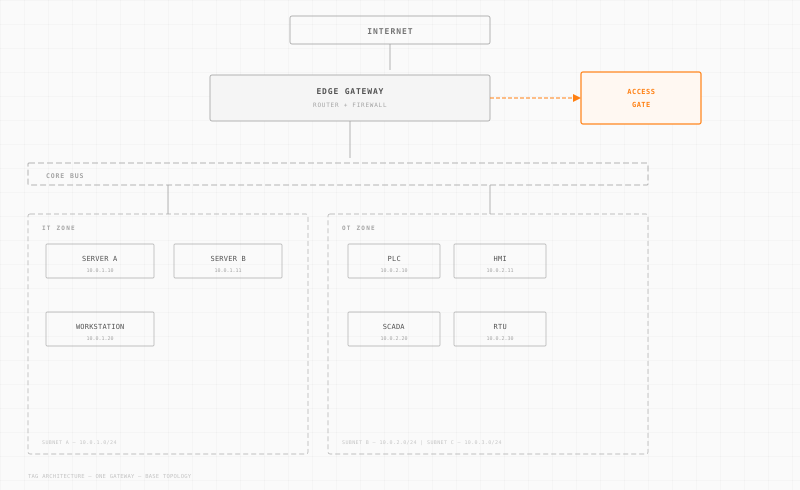
Trout Access Gate does not replace your identity provider. It enforces what the IdP says, at the network layer, in front of OT assets. The YubiKey is configured against your IdP — typically Microsoft Entra ID, Okta, or any WebAuthn-compatible directory — and the Access Gate validates the resulting assertion before opening a path to the protected resource.
The flow looks like this:
- The user navigates to a resource behind the Access Gate (an HMI, a jump host, an engineering workstation).
- The Access Gate intercepts the connection and redirects to the IdP.
- The IdP prompts for the YubiKey. The user touches the key. WebAuthn signs a challenge with the private key that never leaves the device.
- The IdP returns a signed assertion to the Access Gate.
- The Access Gate evaluates the assertion against its own zero-trust policy — user, device, time-of-day, source enclave — and either opens the path or denies.
The Access Gate never sees the YubiKey directly. It sees the IdP's signed claim that the YubiKey was present. That separation is what lets the same YubiKey unlock corporate SaaS, the Trout-protected jump host, and the Modbus-segmented PLC zone — without three different enrollment workflows.
Configuration: What to Set Up Where
A working YubiKey-on-Access-Gate deployment has three configuration surfaces. None of them are inside the YubiKey itself.
At the identity provider:
- Enable WebAuthn (FIDO2) as a supported authentication method.
- Require it for the user groups that will access OT resources. A "OT-Operators" group is the common pattern.
- Decide on user verification policy — PIN-required versus touch-only. PIN-required gives you a stronger second factor for shared keys; touch-only is faster for single-user assignments.
At the Trout Access Gate:
- Federate the gateway to your IdP (SAML or OIDC, depending on what your IdP exposes).
- Bind the relevant zero-trust policies to the IdP groups that require YubiKey. The policy says "user from this group, authenticated this strongly, may reach this enclave."
- Decide on session lifetime. OT shifts are long; corporate defaults of 8 hours often need extending — but only inside the operational network, never for remote access.
At the endpoint:
- For browser-based logins (most jump hosts and admin consoles), no client software is needed. WebAuthn is built into modern browsers.
- For RDP-driven workflows, route the RDP session through a Trout-protected web gateway so the YubiKey gates the session at connect time. Native Windows-credential YubiKey support is possible but adds complexity that most OT teams do not need.
Trout's documentation covers the IdP-specific federation steps for the major providers — see the Trout documentation or contact us if your IdP is not on the list yet.
Operational Realities to Plan For
The rollout fails on operations, not on cryptography. Three things to plan for before you order keys:
Lost and damaged keys. Industrial environments destroy USB-A keys at a steady rate. Issue at least two keys per user — a primary and a backup registered to the same identity. Keep a small pool of pre-enrolled spares with the on-site IT lead so a lost key during a shift does not stop production. Build a documented revoke-and-replace procedure that runs in under fifteen minutes.
Shared workstations and shared keys. A YubiKey assigned to a shift rather than a person is operationally simpler and audit-poorer. If you go that route, pair it with an Access Gate session policy that re-authenticates on idle, and log every session against a shift identifier. The IdP audit trail plus the Access Gate session log together give you the per-incident attribution you need.
Air-gapped enclaves. WebAuthn does not require internet — it requires a path to the IdP. If a control-system enclave is fully air-gapped, the YubiKey still works, but the IdP and Access Gate need to live inside the air-gap boundary. Trout Access Gate runs entirely on-premise specifically for this case; pair it with an on-prem IdP (Active Directory Federation Services, Keycloak, or similar) and the YubiKey trust chain stays inside your perimeter.
Onboarding throughput. The slowest step in a YubiKey rollout is enrollment, not deployment. Plan an enrollment day per site, with the IT lead, a list of users, and a cabinet of pre-labeled keys. A self-service enrollment portal saves time only if your IdP has one and your users have a way to reach it from inside the network.
The Bottom Line
A YubiKey on a Trout Access Gate is the simplest way to bring genuine multi-factor authentication into an OT environment that still has shared HMIs, contractors with badges, and assets that have not been touched by a software update in five years. The cryptography is solved. What is left is the operations work — issuing keys, training operators, and writing the policies that say which user, on which key, on which device, from which enclave, may touch which PLC.
Trout Access Gate handles the policy enforcement and the network-side controls. The YubiKey handles the user-side proof. Your IdP is the broker between them. Get those three surfaces right and you have an OT authentication story that holds up to phishing audits, CMMC assessments, and three a.m. shift changes.
For deployment specifics — IdP federation, policy templates, session lifetime defaults — start with the Trout documentation or request a demo and we will scope the integration to your environment.