
The short version.
On October 13, 2026, CISA published ICSA-26-286-01 for Inductive Automation Ignition. It covers one vulnerability, CVE-2026-92817, in Ignition 8.1.0 through 8.1.54 and 8.3.0 through 8.3.8. It scores CVSS v3.1 8.8 and CVSS v4.0 8.7.
The attacker does not need an engineering account. An authenticated user with access to a Vision project can reuse a valid Vision session to gain Designer-level privileges, and from there run arbitrary code in the Ignition Gateway process. Every account that can log in to a Vision client is a potential Designer.
The fix is Ignition 8.1.55 or 8.3.9. Then separate operator HMI access from Designer and gateway admin access, by person and by machine. CISA says no known public exploitation has been reported to it.
Why Ignition matters.
Ignition is an HMI and SCADA platform. The Ignition Gateway is the server at its center. It talks to the PLCs through its device drivers and OPC UA, logs to databases, and serves the screens operators use: Vision clients on control room workstations and Perspective sessions in a browser.
Designer is the engineering tool. It is launched against the gateway and edits the projects that gateway runs: screens, tags, alarms, and scripts. Scripts written in Designer can run on the gateway itself, in Python. Designer access is engineering access to the whole site the gateway serves.
That is why the two roles are normally kept apart. An operator acknowledges alarms and changes setpoints on the screens they are given. An engineer changes what the screens, tags and scripts are. CVE-2026-92817 removes that line for anyone holding a Vision session.
What the advisory says.
- Product: Inductive Automation Ignition, versions 8.1.0 through 8.1.54 and 8.3.0 through 8.3.8.
- Fix: Ignition 8.1.55 or 8.3.9, or later.
- Sectors: Critical Manufacturing, Energy, Information Technology. Deployed worldwide. Vendor headquartered in the United States.
- Reported by: Tim Hemingway, per CISA. Inductive Automation also credits Abhinav Agarwal, who reported independently.
| CVE | CVSS v3.1 | CVSS v4.0 | What it allows, per the advisory | Access in the v3.1 vector |
|---|---|---|---|---|
| CVE-2026-92817 | 8.8 | 8.7 | The Perspective module does not properly validate session privileges for Designer-level access. A user with access to a Vision project can use a valid Vision session identifier to gain Designer-level privileges, leading to arbitrary code execution in the Ignition Gateway process (CWE-863) | Network, low privileges, no user interaction |
Read the privileges column closely. Low privileges means a normal login, not an admin one. The vector also needs no user interaction: nobody has to click anything.
The vendor bulletin covers more. Inductive Automation's Trust Center describes CVE-2026-92817 as an authenticated remote code execution in the gateway that could expose gateway credentials and connected databases and devices. The same bulletin lists CVE-2026-63252, a denial of service that can exhaust gateway memory, fixed in the same versions. That is the same CVE identifier CISA lists two days later for the Eclipse Milo OPC UA SDK in ICSA-26-288-01. A separate Trust Center entry covers CVE-2026-77393: on 8.1.53 and earlier, a blank "Create Project Role(s)" setting let any authenticated user create projects, fixed in 8.1.54.
How the flaw plays out.
The way in is an ordinary account. Vision clients sit on control room workstations, sometimes under a shared operator login. Some sites also give Vision access to supervisors, maintenance or office users who only need to view screens. Each of those accounts holds a valid Vision session.
The session becomes Designer access. Because Designer-level privileges are not properly checked against the session, the Vision session is accepted for Designer-level actions. The user never needed the Designer role.
Designer access becomes code on the gateway. Per the advisory, the escalation can lead to arbitrary code execution in the Ignition Gateway process. The gateway holds the connections to the PLCs and databases, and the credentials for them. Code running there can read them, change projects, or act through them.
The network path is the ordinary one. In the Ignition defaults, Vision clients, Perspective sessions, Designer and the gateway web interface all reach the gateway on the same web ports, 8088 for HTTP and 8043 for HTTPS. Gateway-to-gateway traffic uses 8060. A firewall rule that lets an operator station run Vision also lets it reach everything else the gateway serves on that port.
The table maps the flaw to MITRE ATT&CK for ICS. It describes what the flaw allows, not an observed attack. ATT&CK for ICS v20 moved Scripting to Command and Scripting Interpreter, shown with the old ID.
| Tactic | Technique (ID) | How it applies here |
|---|---|---|
| Initial Access, Lateral Movement | Valid Accounts (T0859) | An ordinary account with access to a Vision project is the starting point |
| Privilege Escalation | Exploitation for Privilege Escalation (T0890) | Reusing a valid Vision session identifier to gain Designer-level privileges, CVE-2026-92817 |
| Execution | Command and Scripting Interpreter: Python (T1701.005, formerly T0853) | Likely route: Designer-level access to gateway scripting, which Ignition runs in Python, to execute code in the gateway process |
| Persistence | Modify Program (T0889) | Conditional: changing Ignition projects, screens or scripts with Designer-level privileges |
| Collection | Data from Information Repositories (T0811) | Conditional: reading gateway credentials and the databases connected to it, as the vendor describes |
| Impact | Manipulation of View (T0832) | Possible consequence: operators see screens or values an attacker has changed |
| Impact | Manipulation of Control (T0831) | Possible consequence: writes to PLC tags through the gateway's device connections |
What to do before and after the update.
Start with the vendor's and CISA's steps. Update to Ignition 8.1.55 or 8.3.9, or later. Where you cannot update yet, Inductive Automation points to its Ignition Security Hardening Guide: restrict network exposure of the gateway, keep segmentation in place, and limit gateway access to trusted users and hosts. The vendor is clear that these steps reduce exposure but do not fix the flaw. CISA also asks you to keep control system devices off the internet, put them behind firewalls away from the business network, and use a secure method such as a VPN when remote access is needed.
Count the accounts that can open Vision. Each one is a possible Designer until the update. Disable the ones nobody uses, and replace shared operator logins with named ones where the site allows it.
Separate operator access from Designer access by machine. Operator stations need Vision or Perspective. Designer belongs on one or two engineering workstations, used under named accounts. Office PCs and vendor laptops need neither, or only a view.
Limit what the gateway host itself can reach. If code runs in the gateway process, the gateway host's network access is what the attacker gets. Allow it only its PLCs, its databases and its peer gateways, on their ports.
After the update, check the projects. Review recent project changes and gateway scripts for edits nobody planned, and rotate the credentials the gateway stores for databases and devices if you find any.
How Access Gate helps, and its limits.
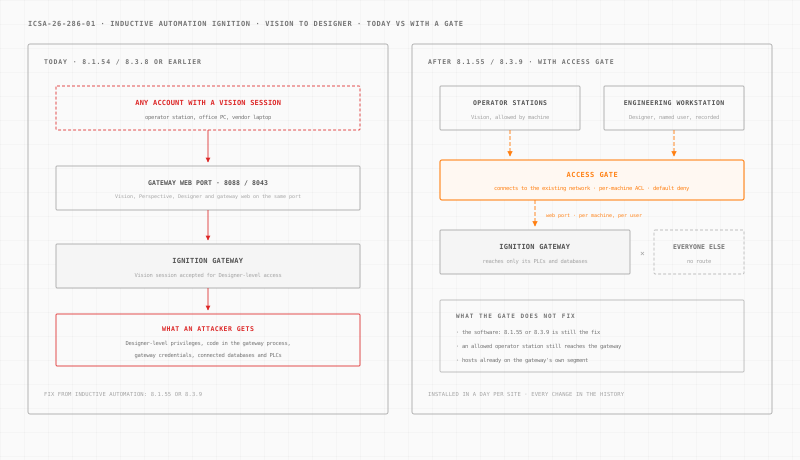
Access Gate is an appliance installed at each site. It connects to your existing network, beside it. You then steer the traffic to the Ignition Gateway through it, one gateway or one subnet at a time. Nothing is installed on the gateway or the clients. It is installed in a day per site.
Once the traffic flows through the gate, four documented features do the work.
A per-machine rule decides who reaches the gateway. Access control lists are default deny, and a principal can be a machine, a user or a directory group. One rule allows the control room stations to reach the gateway on its web port. Another allows the engineering workstation. Another allows the gateway host to reach only its PLCs and databases. Every other host gets no route to the gateway, and that removes most of the Vision accounts from reach.
A named person signs in before Designer. An access screen asks the engineer to log in with their own directory account before the engineering workstation reaches the gateway. Access expires after a preset timeout of 15 minutes, 1 hour or 8 hours.
Engineering sessions are recorded. With privileged access management, an engineer or integrator opens the engineering workstation by RDP in a browser session tied to their name, and runs Designer there. The session is time-limited and recorded. Where clients still use plain HTTP on 8088, the gate can wrap the path in TLS, so logins and session identifiers do not cross the network in clear.
Every rule change is kept. The enclave change history records who changed which rule and when. If you run gateways across many plants, those rule changes can be driven from your LLM on Access Gate Performance.
The limits are real. Access Gate does not fix Ignition: 8.1.55 or 8.3.9 is still the fix. Vision and Designer use the same gateway port, so the gate separates them by machine and by person, not by inspecting Ignition traffic. An operator station that is allowed to run Vision still reaches the vulnerable gateway, and a user there can still attempt the escalation until the update. A host on the gateway's own segment, outside the gate, is outside its control. And credentials the gateway already exposed must still be rotated.
For the wider design, see OT network security, OT identity and secure remote access.
What to do this week.
- List every Ignition Gateway with its version, and mark those on 8.1.54 or earlier and 8.3.8 or earlier.
- Download Ignition 8.1.55 or 8.3.9 and schedule the update with the operations team for each gateway.
- Count the accounts with Vision access, disable the unused ones, and note the shared logins.
- Test who can reach each gateway on 8088, 8043 and 8060, from the corporate network, the vendor VPN and the internet.
- Move Designer work to named engineering workstations, and allow everyone else only the access their screens need.
- Restrict the gateway host's own connections to its PLCs, databases and peer gateways.
- After the update, review recent project and script changes, and rotate gateway-stored credentials if anything looks wrong.
Want to see where a gate would sit at your plant? Build your network in a few minutes. Every other advisory we have covered is in the ICS security advisories archive.
Sources: CISA ICS Advisory ICSA-26-286-01 (October 13, 2026); the Inductive Automation Trust Center entry "Ignition Software Upgrade Recommendations"; the Ignition Gateway port reference; the CISA Known Exploited Vulnerabilities catalog, checked October 15, 2026; and MITRE ATT&CK for ICS v20. Confirm affected versions and the upgrade procedure with Inductive Automation before updating a production gateway.