
Automate OT firewall rules from your LLM.
Access Gate Performance lets your LLM automate OT firewall rules: iterate in plain words, dry-run the config file, and a person pushes it to every plant at once. Every change is recorded and reversible.
Last updated:
Trusted by leading companies


Give the packaging line vendor SSH to every packaging PLC and HMI in all six plants, sign-in first, encrypted, until Friday.
By hand: 230 rules, typed into 6 firewall consoles.
- 01Iterate with your LLMDone
- 02Dry-run the config file230 rules prepared
- 03Push the migrationWaiting for you
- 04LiveAll 6 plants
Why OT access rules fall behind
Every plant keeps its own firewall policy, written rule by rule in a firewall UI or CLI. Across many plants, one change takes weeks, and drift between plants sets in. So OT security ships late, and nobody is sure what is allowed.
How does LLM firewall rule automation work?
Your LLM works through admin access to the appliance. Nothing goes live until a person pushes it.
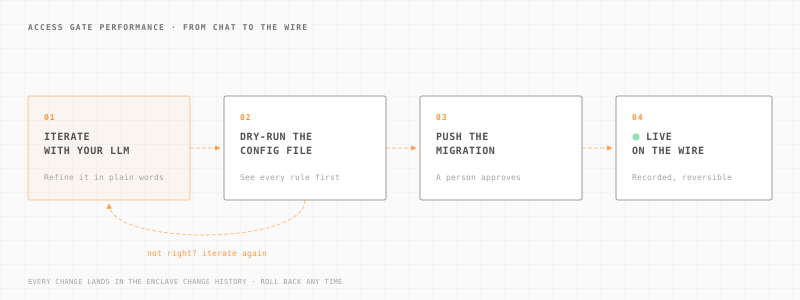
- 01
Iterate with your LLM.
Describe the change in plain words, for example vendor access to 230 machines in six plants, and refine it until it says what you mean.
- 02
Dry-run the config file.
Your LLM prepares the configuration. The dry run shows every rule it would create before any of them exists. Not right? Go back to step one.
- 03
Push the migration.
A person approves the change and pushes it. Every plant gets it at once.
- 04
Live.
Access Gate enforces it on the wire. The change lands in the enclave change history, and you can roll it back.
Is it safe to let AI change OT firewall rules?
Yes. Nothing goes live until a person pushes it.
A dry run before anything changes.
Your LLM prepares the change. A person reads the dry run and pushes it.
It never touches your machines.
Your LLM changes the Access Gate configuration through a scoped account, nothing else. Run it locally and nothing leaves the site. Your PLCs and HMIs stay as they are.
Every change in the history.
Prepared by your LLM, pushed by a named person, with the time. Roll back any time.
Change historyYour LLM for big moves, the interface for fine work.
Provision a plant or 230 machines with your LLM. Make precise edits and upkeep in the interface.
How does it compare with managing firewall policy in a UI or CLI?
How each method of firewall policy management holds up when the same rule base must run in many plants.
| Criterion | Firewall UI | Firewall CLI / scripts | Your LLM driving Access GateAccess Gate Performance |
|---|---|---|---|
| Time per change at scale | SlowOne screen per rule, on each plant's firewall. | MediumFaster once someone writes and maintains the scripts. | Plain wordsDescribe the change once. Your LLM prepares it. |
| Risk of drift | HighEach plant is edited by hand, so copies diverge. | MediumScripts help until they fall out of date. | LowRules live in one place. Each change is reviewed before it applies and recorded. |
| Review before apply | VariesDepends on the team's own process. | PartialPossible when scripts go through peer review. | Dry runDry run first, then a person applies the change. |
| Audit trail | Per deviceChange logs sit on each firewall. | PartialScript history, when someone keeps it. | Every changeEach change lands in the enclave change history. |
| Rollback | ManualUndo by hand or restore a backup. | PartialRerun an older script, if it was kept. | SupportedRoll back any change you do not want. |
| Per-user sign-in | Add-onPossible with a directory agent; OT rules often still match addresses. | Add-onPossible with a directory agent; OT rules often still match addresses. | Per userAn access screen asks each user to sign in. |
Enforcing in a day, managed in plain words.
Access Gate connects to your existing network. Nothing is installed on your machines.
LLM management is available today on Access Gate Performance only. Essential does not include it.
Access Gate PerformanceQuestions about firewall rule automation with your LLM.
Agents installed on your machines. Your LLM changes the Access Gate configuration, and Access Gate enforces it on the wire.
Generating and applying access rules for many OT machines from one described intent, instead of typing them rule by rule into each plant's firewall. With Access Gate Performance, your LLM prepares the change, a dry run shows it, and a person pushes it.
Yes. Any LLM agent tool that can use admin access to the appliance works, Claude Code and ChatGPT being two examples. Access Gate does not depend on one model. Your team keeps the tool it already uses.
No. LLM management is available today on Access Gate Performance only. Essential does not include it.
The Access Gate configuration: who reaches which machine, the access screen, encryption and the access control lists. It works through admin access to the appliance and its database. It does not touch your machines.
Yes, for the fine work. Use your LLM for provisioning and large changes, such as a new plant or a vendor across hundreds of machines. Use the interface for precise edits to one rule, user or machine, and for upkeep over time.
Run it as a dry run. You see what would change, and nothing is applied. A person then reviews the change and applies it.
In the enclave change history, with who made the change and when. A change shows that your LLM prepared it and which person pushed it. Users cannot edit or delete that history.
Not if you choose so. You can run a local, self-hosted LLM, so the configuration never leaves your site. Give it a scoped or read-only account and it can only do what that account allows.
Each plant has its own Access Gate, and all of them are managed from one shared control plane. Your LLM prepares the change there, and a person pushes it once for every plant.
Yes. You can roll back any change that does not do what you expected.
No. The LLM changes the Access Gate configuration only. Nothing is installed on your machines, and Access Gate enforces the rules on the wire.
Each Thales deployment took 4 hours from installation to enforcement. Read the Thales story.
No. Your LLM works through admin access to the appliance and its configuration database. Any agent tool that can use that access can manage Access Gate.
See it on your network
Watch one change go from request to rule.
In a demo, we describe a change in plain words, dry-run it, apply it and roll it back.