
The short version.
On October 27, 2026, CISA published ICSA-26-300-02 for Mitsubishi Electric ICONICS software: GENESIS, GENESIS64, ICONICS Suite, Hyper Historian, AnalytiX, MobileHMI, IoTWorX, MC Works64, GENESIS32 and BizViz. It covers four CVEs. The highest score is CVSS v3.1 9.1.
The two that matter sit in how the server decides who is an administrator. The password-recovery unlock uses one challenge response that is fixed and the same for every user (CVE-2026-16436), so whoever learns it can unlock the system from the network without an account. And the installers give the product's administrator account DCOM rights it does not need (CVE-2026-16438), so that account can launch and operate DCOM objects on the server remotely. On the server that draws the plant's screens and keeps its history, that is control of what operators see.
The fix is GENESIS 11.04 or version 10.98 for GENESIS64, ICONICS Suite, Hyper Historian, AnalytiX, MobileHMI and IoTWorX. Mitsubishi Electric will not fix MC Works64, GENESIS32 or BizViz. The advisory records no exploitation. Until the update, and for good on the unfixed products, let only named engineers reach the server.
Why an ICONICS server matters in the plant.
GENESIS64 is a SCADA and HMI platform. It runs on a Windows server, collects data from PLCs and OPC servers, draws the operator screens, raises the alarms, and through Hyper Historian keeps the record of what the process did. AnalytiX adds energy and fault analytics, MobileHMI puts the screens on phones, IoTWorX runs at the edge. MC Works64 is the same platform sold by Mitsubishi Electric with its factory automation line, and GENESIS32 is the older 32-bit generation that still runs on many lines.
That server is the plant's trusted view. Operators act on what it shows, and auditors read what it stored. An attacker who controls it does not need to touch a PLC to stop a line: hiding an alarm or showing a false value is enough.
And it is one of the most reached machines on the plant network. Operator clients, engineering laptops, the historian's consumers in IT, and the integrator who maintains the project all connect to it. On many sites that integrator connects over remote desktop from outside. Our guides on patch management in operational environments and maintenance window planning cover why updating it can wait for weeks.
What the advisory says.
- Products and fixes: GENESIS up to 11.03, fixed in 11.04. GENESIS64, ICONICS Suite, Hyper Historian, AnalytiX, MobileHMI and IoTWorX up to 10.97.3, fixed in 10.98. For CVE-2023-4863 only, GENESIS64 and ICONICS Suite 10.97 to 10.97.2, fixed in 10.97.3.
- No fix planned: MC Works64, GENESIS32 and BizViz, all versions.
- Sectors: Critical Manufacturing. Deployed worldwide. Mitsubishi Electric is headquartered in Japan, Mitsubishi Electric Iconics Digital Solutions in the United States.
- Coordination: Mitsubishi Electric advisory 2026-006, first released October 15, 2026. Mitsubishi Electric found the vulnerabilities itself.
| CVE | CVSS v3.1 | What it allows, per the advisory | Access in the vector | Products |
|---|---|---|---|---|
| CVE-2026-16438 | 9.1 | The installers grant default DCOM permissions to the product's administrator account. Anyone who logs in with that account can launch and operate DCOM objects, locally or remotely (CWE-266) | Network, high privileges, scope changed | GENESIS64, ICONICS Suite, Hyper Historian, AnalytiX, MobileHMI, MC Works64 |
| CVE-2026-16436 | 8.1 | The password-recovery challenge response is fixed and common to all users. A remote attacker who obtains it can unlock the system (CWE-640) | Network, no privileges, high complexity | All ten products |
| CVE-2023-4863 | 8.2 | libwebp heap overflow: an administrator who imports a crafted file runs arbitrary code (CWE-787) | Local, high privileges, scope changed | GENESIS64, ICONICS Suite 10.97 to 10.97.2 |
| CVE-2026-16437 | 6.4 | A local administrator can tamper with the file that stores the challenge responses and unlock the system (CWE-640) | Local, high privileges, high complexity | All ten products |
Read the privileges column with the products column. CVE-2026-16436 needs no account at all, only the response. CVE-2026-16438 needs the administrator account, and the first flaw is a way to get one. On MC Works64, which will never be fixed, both are present.
How the vulnerabilities work.
The unlock is a shared key. When a user forgets a password, the product offers a challenge, and the right response unlocks the system. Because that response is fixed and identical for every user, it behaves like a master password nobody chose. It does not change when staff leave or when the integrator's contract ends. Anyone who saw it once, in a support call, a commissioning note or the file on disk, still has it. The advisory rates the attack complexity high for that reason: the attacker first has to obtain the response.
The response lives in a file an administrator can rewrite. Version 10 keeps it in ClientChallengeTable.dat, version 11 in SecurityChallenges.dat. Windows protects the file, but the product's administrators can read and write it (CVE-2026-16437). Someone who already has admin on the server can plant a response of their own and come back later without an account.
The admin account reaches further than the product. DCOM lets one Windows machine start and drive software objects on another, over the RPC endpoint mapper on TCP 135 and a range of dynamic ports. The ICONICS installers grant the product's administrator account default DCOM permissions it does not need (CVE-2026-16438). So the ICONICS admin login is also a remote way to run objects on the server, which is why the scope is changed and the score 9.1. CISA's SSVC entry rates both this flaw and the unlock flaw as automatable.
Put together, the path is short. In our reading, and not as a chain the advisory describes: an attacker who reaches the server and holds the unlock response gets to an administrator session, and that account then reaches DCOM from the network. On a flat plant network, "reaches the server" means any office PC or vendor laptop.
The libwebp flaw is old and narrow here. CVE-2023-4863 is the WebP heap overflow that was exploited in Google Chromium in 2023 and has been in CISA's KEV catalog since September 13, 2023. In GENESIS64 it needs an administrator to import a crafted file, which is why it scores lower than in a browser. Version 10.97.3 removes it.
The table maps the vulnerabilities to MITRE ATT&CK for ICS. It describes what the flaws make possible, not an observed attack. It uses ATT&CK v20.
| Tactic | Technique (ID) | How it applies here |
|---|---|---|
| Initial Access | Internet Accessible Device (T0883) | Conditional: an ICONICS server or its remote desktop reachable from outside the plant |
| Lateral Movement, Persistence | Hardcoded Credentials (T0891) | Closest fit: the fixed unlock response common to every user, CVE-2026-16436 |
| Persistence | Valid Accounts (T0859) | A response planted in the challenge file, CVE-2026-16437, or the administrator account itself |
| Lateral Movement | Remote Services (T0886) | DCOM launched and operated remotely with the administrator account, CVE-2026-16438 |
| Execution | User Execution (T0863) | An administrator importing a crafted WebP file, CVE-2023-4863 |
| Impact | Manipulation of View (T0832) | Possible consequence: screens and alarms operators act on, changed on the server |
| Impact | Denial of View (T0815) | Possible consequence: the advisory's denial-of-service outcome on the HMI server |
What to do before and after the update.
Start with the vendor's and CISA's steps. Install GENESIS 11.04 or version 10.98 on every affected product, after testing the project on a spare server. Mitsubishi Electric also asks for admin-only logins on the server, remote login blocked from untrusted networks and from non-administrator users, physical access restricted, and antivirus on the server and the PCs that reach it. CISA recommends keeping control system devices off the internet, behind firewalls, isolated from the business network, and treating a VPN as only as secure as the devices on it.
Neutralise the unlock file now, on every version. On GENESIS, GENESIS64, ICONICS Suite, Hyper Historian, AnalytiX, MobileHMI and MC Works64, Mitsubishi Electric's workaround is to delete the challenge file (C:\Program Files\ICONICS\GENESIS64\Components\ClientChallengeTable.dat on version 10, C:\ProgramData\ICONICS\11\SecurityChallenges.dat on version 11), create an empty file with the same name, and restrict write and delete on it to a separate administrator account, not the GENESIS administrator. This is the one step that removes the shared key before the update.
Find every server. List each ICONICS installation with product, version and the line or building it serves. Count the ones people forget: the historian, the MobileHMI server, the IoTWorX container at the edge, and the old GENESIS32 station that still runs one machine.
Treat the product administrator as a privileged account. It now carries remote DCOM rights. Give it a password nobody shares, do not use it for daily work, remove it from vendor hands, and review which Windows accounts can log in to the server at all.
Close DCOM and remote desktop to everyone but engineering. Operator clients need the HMI ports their configuration uses. They do not need TCP 135, the dynamic RPC range or remote desktop. Allow those only from the engineering workstations that maintain the project.
For MC Works64, GENESIS32 and BizViz, plan the exit. No fix is coming. Apply the workaround, close the server off as above, and put the migration to a supported version in the next budget.
How Access Gate helps, and where it stops.
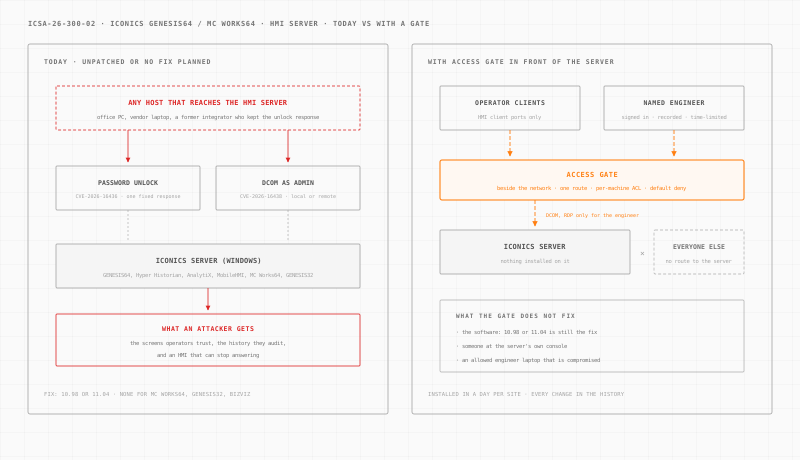
Access Gate is an appliance installed at each site. It plugs into your existing network, beside it. You then route traffic to the server through it with one route on the existing router, one server or one cell at a time. Nothing is installed on the ICONICS server. It installs in a day per site.
Once traffic goes through the gate, four documented features do the work.
A per-machine rule decides who reaches what. Access control lists deny by default. One rule lets operator clients reach the HMI ports they use. A separate rule covers DCOM and remote desktop. No other host gets a route to the server, so an unlock response in the wrong hands is useless from the office network.
A named person signs in first. An Access Screen asks the engineer to sign in with their own directory account before their workstation reaches the server. Access expires after a set timeout of 15 minutes, 1 hour or 8 hours. That puts a real identity in front of an account the advisory shows can be unlocked by anyone.
Vendor and engineer sessions are recorded. With privileged access management, the integrator opens a remote desktop session to the server in the browser, tied to their name. Access is granted for an intervention window and revokes itself, and the session is recorded.
Every rule change is kept. The enclave change history records who opened which rule, and when. Across many plants, these rules can be driven by your LLM on Access Gate Performance.
The limits are real. Access Gate does not fix the software: 10.98 or 11.04 is still the fix, and the unlock file workaround still applies. It does not inspect DCOM calls or see what happens inside the server. Someone at the server's own console, or an engineer allowed through whose laptop is compromised, still reaches the vulnerable product. A host on the server's own segment, outside the gate, is beyond its control.
For the wider design, see OT network security, secure remote access, OT identity, our guide to secure OT remote access and our page on manufacturing cybersecurity. The Ignition privilege escalation analysis covers the same problem on another SCADA platform.
What to do this week.
- List every ICONICS server with product, version and the line or building it serves, including GENESIS32 and MC Works64.
- Apply the unlock file workaround on every installation, fixed or not.
- Change the product administrator's password and take it out of shared and vendor use.
- Check who reaches each server on TCP 135, the dynamic RPC range and remote desktop, from the business network, the vendor VPN and the internet.
- Allow DCOM and remote desktop only from the engineering workstations that maintain the project.
- Schedule 10.98 or 11.04 after a test on a spare server.
- Put the MC Works64, GENESIS32 and BizViz migration on next year's plan.
Want to see where a gate would sit in your plant? Build your network in a few minutes. For every other advisory we have covered, see the ICS security advisories archive.
Sources: CISA ICS Advisory ICSA-26-300-02 (October 27, 2026) and its CSAF file, republishing Mitsubishi Electric advisory 2026-006; the CISA Known Exploited Vulnerabilities catalog, checked on October 28, 2026 (version 2026.10.27); and MITRE ATT&CK for ICS v20. Confirm affected versions and the update procedure with Mitsubishi Electric Iconics Digital Solutions before updating a production server.