
The short version.
On October 8, 2026, CISA published ICSA-26-281-01 for Red Lion Controls N-Tron 700 Series managed industrial Ethernet switches. It covers seven CVEs in firmware 3.11.0 and earlier and bootloader 2.0.6.1 and earlier. The highest scores are CVSS v3.1 8.3 and CVSS v4.0 9.3.
This time the network gear itself is the target. A default admin account stays enabled after you add your own. Passwords sit in the configuration file in plaintext. SNMP can change accounts, pull the configuration and push firmware without a login. One URL reboots the switch.
The fix is firmware 3.11.1 or later. Then make the switch's web interface, SSH and SNMP reachable only from the people and stations that need them. CISA says no known public exploitation has been reported to it.
Why a managed switch matters.
An industrial switch connects the PLCs, HMIs, drives and historians on a production line. Every control message on that segment crosses it.
A managed switch also has its own admin interface: a web GUI, a command line, SNMP for monitoring. Whoever controls that interface controls the network around it. They can change VLANs and port settings, read the configuration, or take the switch down. When a switch reboots, everything behind it loses its connection until it comes back.
Switches are also easy to forget. They rarely appear on a patch list next to the PLCs, and their default accounts often survive commissioning.
What the advisory says.
- Product: Red Lion Controls N-Tron 700 Series. Firmware 3.11.0 and earlier, bootloader 2.0.6.1 and earlier.
- Fix: firmware 3.11.1 or later.
- Sectors: Commercial Facilities, Communications, Critical Manufacturing, Information Technology. Deployed worldwide.
- Reported by: Gabrianna (Ria) Milloway of Idaho National Laboratory.
| CVE | CVSS v3.1 | CVSS v4.0 | What it allows, per the advisory | Access in the v3.1 vector |
|---|---|---|---|---|
| CVE-2026-32645 | 6.0 | 9.2 | Default admin credentials stay enabled after other admin accounts are configured (CWE-798) | Local, high privileges |
| CVE-2026-39460 | 8.1 | 9.3 | Usernames and passwords stored in plaintext in the configuration file, which can be exported by TFTP (CWE-522) | Network, low privileges |
| CVE-2026-28745 | 7.5 | 9.3 | Passwords stored with weak encryption, so known default credentials expose the others (CWE-257) | Network, no privileges |
| CVE-2026-33367 | 8.1 | 9.3 | SNMP performs admin actions, including firmware upgrades and downgrades, with no authentication (CWE-306) | Network, low privileges |
| CVE-2026-29797 | 7.1 | 8.4 | Firmware and bootloader updates need no authentication and no integrity check (CWE-494) | Network, low privileges |
| CVE-2026-39453 | 8.3 | 8.5 | A specific URL on the web server reboots the switch, and can be scripted (CWE-617) | Network, low privileges |
| CVE-2026-33272 | 4.9 | 6.8 | With physical access, boot from factory settings, log in with the default admin, and keep the changes (CWE-288) | Physical, low privileges |
Read the SNMP row closely. The description says no authentication is needed. The v3.1 vector scores it with low privileges. Treat SNMP access to the switch as admin access either way.
How the flaws chain together.
The flaws are worse together than alone.
The default admin is the way in. It stays enabled after commissioning, so a switch set up with new accounts still accepts the factory login.
Then every password comes out. Logged in as admin, the configuration file can be read from the command line or exported by TFTP from the web interface. It holds usernames and passwords in plaintext. SNMP can start the same TFTP export without a login. TFTP itself carries the file across the network unencrypted.
Then the switch can be changed or stopped. SNMP can modify user accounts and settings, and start firmware or bootloader upgrades or downgrades. The advisory says anyone with the same software can scan a network for N-Tron devices and push or pull firmware by SNMP and TFTP. Separately, one URL on the web server reboots the switch, and a script can keep it rebooting.
The table maps the flaws to MITRE ATT&CK for ICS. It describes what the flaws allow, not an observed attack. ATT&CK for ICS v19 moved Default Credentials and System Firmware to new IDs, shown with the old ones.
| Tactic | Technique (ID) | How it applies here |
|---|---|---|
| Discovery | Remote System Discovery (T0846) | Scanning a network for N-Tron devices, as the advisory describes |
| Lateral Movement, Persistence | Default Credentials (T1694.001, formerly T0812) | The factory admin account that persists, CVE-2026-32645 |
| Discovery | Network Sniffing (T0842) | Conditional: capturing a configuration file with plaintext passwords as it crosses the network by TFTP |
| Lateral Movement, Persistence | Valid Accounts (T0859) | Reusing passwords recovered from the configuration file |
| Persistence, Inhibit Response Function | System Firmware (T1693.001, formerly T0857) | Pushing firmware or bootloader images with no authentication or integrity check |
| Inhibit Response Function | Denial of Service (T0814) | The scripted reboot URL, CVE-2026-39453 |
| Impact | Loss of View (T0829) | Possible consequence: HMIs and SCADA lose their link while the switch keeps rebooting |
What to do before and after the update.
Start with the vendor's and CISA's steps. Update to firmware 3.11.1 or later, following Red Lion's upgrade procedure. Where you cannot update yet, configure or disable the SNMP communities and disable access to the web GUI. CISA also asks you to keep control system devices off the internet, put them behind firewalls away from the business network, and use a secure method such as a VPN when remote access is needed.
Change every password on the switch. Treat any password stored on an affected switch as known, because the configuration file holds it in plaintext. That includes passwords reused on other equipment.
Separate the management plane from the control traffic. Put the switches' management addresses in their own segment. The switch keeps forwarding PLC and HMI traffic as before. Only the admin path moves.
Decide who needs each service. One admin workstation needs the web GUI and SSH. The monitoring station needs SNMP. Nobody else needs any of the three.
How Access Gate helps, and its limits.
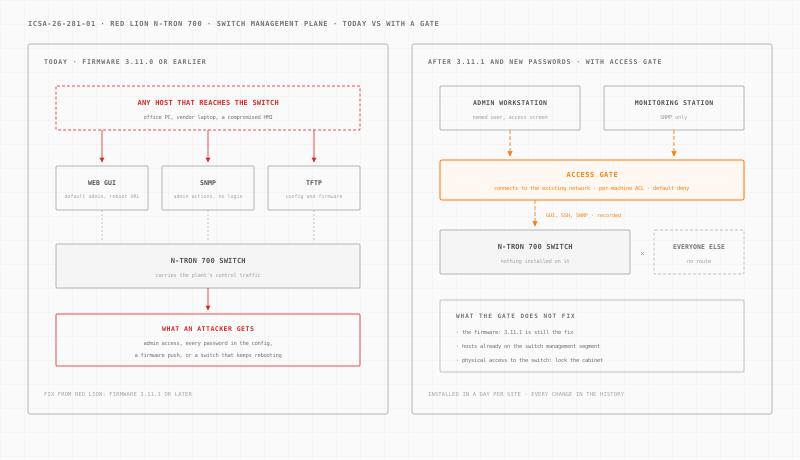
Access Gate is an appliance installed at each site. It connects to your existing network, beside it. You then steer the switches' management traffic through it, one switch or one subnet at a time. Nothing is installed on the switches. It is installed in a day per site.
Once the traffic flows through the gate, four documented features do the work.
A named person signs in first. An access screen asks the admin to log in with their own directory account before the workstation reaches any switch. Access expires after a preset timeout.
A per-machine rule decides the rest. Access control lists are default deny. One rule allows the admin workstation to reach the switch on HTTPS and SSH. Another allows the monitoring station on SNMP. Every other host gets no route to the management plane, which also keeps the reboot URL and the SNMP admin actions out of reach.
Admin sessions are recorded. With privileged access management, the admin opens the switch's web GUI or SSH in a browser session tied to their name. The session is time-limited and recorded. Where the switch's web interface lacks encryption, the gate can wrap it in TLS, so the login does not cross the network in clear.
Every rule change is kept. The enclave change history records who changed which rule and when. If you run many switches across plants, those rule changes can be driven from your LLM on Access Gate Performance.
The limits are real. Access Gate does not fix the firmware: 3.11.1 is still the fix. The admin who is allowed in still reaches a vulnerable web server until the update. A host already plugged into the switch management segment, outside the gate, is outside its control. The physical-access flaw needs a locked cabinet. And a password that already leaked must still be changed.
For the wider design, see OT network security, OT identity and secure remote access.
What to do this week.
- List every N-Tron 700 switch with its firmware and bootloader versions.
- Test who can reach each one on the web GUI, SSH and SNMP, from the corporate network and from the internet.
- Configure or disable SNMP communities, and disable the web GUI where you do not need it.
- Download firmware 3.11.1 and schedule the update with the line it serves.
- Change every password stored on the switches, and any reuse of them elsewhere.
- Restrict the management plane to one admin workstation and the monitoring station.
- Lock the cabinets that hold the switches.
Want to see where a gate would sit at your plant? Build your network in a few minutes. Every other advisory we have covered is in the ICS security advisories archive.
Sources: CISA ICS Advisory ICSA-26-281-01 (October 8, 2026) and its CSAF record; the HMS Networks cybersecurity page linked from the advisory; the CISA Known Exploited Vulnerabilities catalog, checked October 9, 2026; and MITRE ATT&CK for ICS v19. Confirm affected versions and the upgrade procedure with Red Lion before changing a production switch.