
The short version.
On October 20, 2026, CISA published ICSA-26-293-02 for WAGO OS Linux, the firmware on WAGO controllers and panels. It covers two CVEs in firmware 1.0.0 up to 4.10.0 on the CC100, PFC100 G2, PFC200 G2, Touch Panel 600, Edge Controller and WP400. The highest scores are CVSS v3.1 8.8 and CVSS v4.0 8.7.
Both flaws sit in the web-based management (WBM). A user with a low-privileged login can inject shell commands that run as root, and can change protected PROFIBUS settings such as device addressing. On a controller that runs a production line, root access is control of that line.
The fix is firmware 4.10.0 (FW32) or later. A firmware update restarts the controller, so it waits for a maintenance window. Until then, let only approved engineers reach the management interface. The advisory does not report known exploitation.
Why a WAGO controller matters on the line.
The PFC200 and its siblings are compact PLCs built on Linux. They run the machine logic, talk to I/O and fieldbuses, and often bridge to the plant network over Modbus TCP, OPC UA or MQTT. The CC100 does the same job in a smaller housing. Touch Panel 600 and WP400 devices are the HMIs beside them.
The WBM is the browser page used to configure the controller itself: network and routing settings, users, fieldbus settings, firmware. It is an engineering tool. Operators do not need it to run the line.
That is the gap this advisory opens. On many plants, the WBM is reachable from anywhere the controller is, because nobody separated management traffic from production traffic. And patching a running controller means stopping what it controls. Our guides on patch management in operational environments and scheduling maintenance windows in 24/7 plants cover why that can take weeks.
What the advisory says.
- Product: WAGO firmware 1.0.0 up to, but not including, 4.10.0. Model families 0751-9x01, 0750-811x, 0750-821x, 0762-420x, 0762-430x, 0762-520x, 0762-530x, 0762-620x, 0762-630x, 0752-8303/8000-0002 and 0762-340x.
- Fix: firmware 4.10.0 (FW32) or later. WAGO support can supply custom firmware.
- Sectors: Chemical, Commercial Facilities, Critical Manufacturing, Energy, Transportation Systems, Water and Wastewater. Deployed worldwide. WAGO is headquartered in Germany.
- Coordination: CERT@VDE with WAGO, as WAGO advisory VDE-2026-096. Reported to CISA by Ievgen Bondarenko.
| CVE | CVSS v3.1 | CVSS v4.0 | What it allows, per the advisory | Access in the v3.1 vector |
|---|---|---|---|---|
| CVE-2026-80466 | 8.8 | 8.7 | Shell commands injected into WBM routing parameters are stored in a configuration file, then processed by a privileged root helper script. A low-privileged attacker can run commands as root (CWE-78) | Network, low privileges, no user interaction |
| CVE-2026-88850 | 8.1 | 7.2 | The WBM does not enforce permissions for all PROFIBUS configuration operations. A low-privileged attacker can modify root-owned PROFIBUS parameters, including device addressing and SSA settings (CWE-862) | Network, low privileges, no user interaction |
Read the privileges column closely. Low privileges means any working WBM login, not an admin one. Every account on the controller's web interface is a possible root shell until the update.
How the flaws play out.
The way in is the management page. An attacker needs a host that reaches the WBM and one low-privileged account. On a flat plant network, that host can be an office PC, a vendor laptop on a remote access link, or a compromised HMI.
The routing page becomes a root shell. Through CVE-2026-80466, the attacker writes shell commands into a routing parameter. The controller stores the value, and a helper script running as root later executes it. Root on the controller means the attacker can stop the PLC runtime, change what it runs, or use it to reach the next network.
The PROFIBUS settings change without the right permission. Through CVE-2026-88850, the same account can rewrite PROFIBUS parameters it should not touch, including device addressing. Field devices that answer at the wrong address stop exchanging data with the controller, and the machine stops or misbehaves.
The table maps the flaws to MITRE ATT&CK for ICS. It describes what the flaws allow, not an observed attack. It uses ATT&CK v20.
| Tactic | Technique (ID) | How it applies here |
|---|---|---|
| Initial Access | Exploit Public-Facing Application (T0819) | Conditional: a WBM reachable from the business network or the internet |
| Persistence, Lateral Movement | Valid Accounts (T0859) | A low-privileged WBM account is required for both CVEs |
| Execution | Command and Scripting Interpreter: Unix Shell (T1701.003) | Shell commands injected into routing parameters, CVE-2026-80466 |
| Privilege Escalation | Exploitation for Privilege Escalation (T0890) | The injected commands run through a root helper script, CVE-2026-80466 |
| Impair Process Control | Modify Parameter (T0836) | Changing protected PROFIBUS addressing and SSA settings, CVE-2026-88850 |
| Impact | Manipulation of Control (T0831) | Possible consequence: root access on the controller that runs the machine |
| Impact | Loss of Productivity and Revenue (T0828) | Possible consequence: a line stopped by a changed controller or readdressed field devices |
What to do before and after the update.
Start with the vendor's and CISA's steps. Plan firmware 4.10.0 (FW32) or later for every affected device. WAGO points to the security sections of the PFC100 and PFC200 manuals: restrict physical access and use a VPN for remote access. CISA asks you to keep control system devices off the internet, put them behind firewalls away from the business network, and treat a VPN as only as secure as the devices connected to it.
Find every affected device. List each WAGO controller and panel with its model number and firmware version. The WBM shows the firmware, and so does the engineering project. Panels count too: Touch Panel 600 and WP400 run the same firmware line.
Restrict the WBM to an engineering subnet. The controller's production traffic, from HMIs and SCADA, does not need the WBM. Allow the web management ports only from the engineering workstations that configure controllers, and block them from the business network and the vendor VPN.
Count the accounts. Exploitation needs a login, so each account on the WBM matters. Disable the ones nobody uses, change default and shared passwords, and give each engineer a named account where the site allows it.
Watch the PROFIBUS configuration. Export the current PROFIBUS settings for each controller and compare them after any intervention. An addressing change nobody planned is worth a call to the line.
Then schedule the update. Test the application on 4.10.0 on a spare or a test bench, then install it in the line's next window. Our post on maintenance window planning for security updates covers how to fit it in.
How Access Gate helps, and its limits.
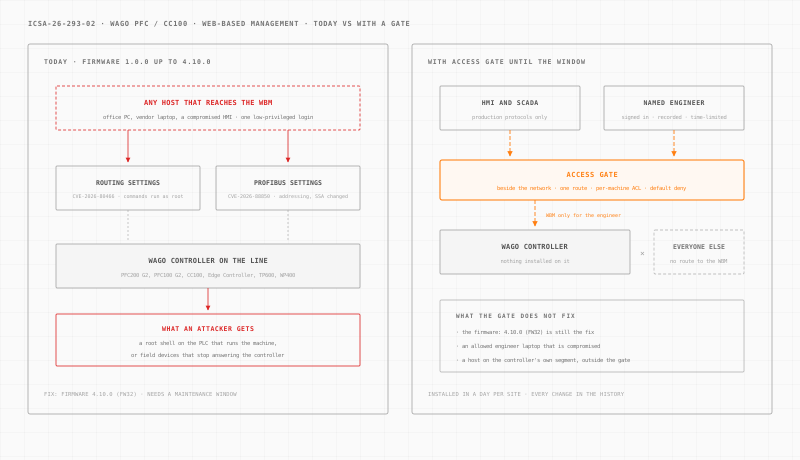
Access Gate is an appliance installed at each site. It connects to your existing network, beside it. You then steer the traffic to the controllers through it with one route on the existing router, one machine or one cell at a time. Nothing is installed on the controllers. It is installed in a day per site.
Once the traffic flows through the gate, four documented features do the work.
A per-machine rule decides who reaches the WBM. Access control lists are default deny. One rule lets the HMIs and the SCADA server keep their production protocols to the controller. A separate rule covers the web management ports. Every other host gets no route to the WBM, so a low-privileged login is useless from the office network.
A named person signs in first. An access screen asks the engineer to log in with their own directory account before their workstation reaches the controller. Access expires after a preset timeout of 15 minutes, 1 hour or 8 hours.
Vendor and engineer sessions are recorded. With privileged access management, an integrator opens the WBM as an HTTPS session in a browser, tied to their name. Access is granted for one intervention window and revokes itself, and the session is recorded.
Every rule change is kept. The enclave change history records who opened which rule and when. Across many plants, those rules can be driven from your LLM on Access Gate Performance.
The limits are real. Access Gate does not fix the firmware: 4.10.0 (FW32) is still the fix. It does not detect the command injection or read PROFIBUS traffic. An engineer allowed to reach the WBM still reaches the vulnerable controller, so a compromised engineering laptop remains a risk. A host on the controller's own segment, outside the gate, is outside its control.
For the wider design, see OT network security, secure remote access, OT identity and our page on manufacturing cybersecurity.
What to do this week.
- List every WAGO controller and panel with its model number and firmware version.
- Mark every device below 4.10.0 and the line or machine each one runs.
- Test who can reach each WBM from the corporate network, the vendor VPN and the internet.
- Restrict the web management to the engineering workstations that configure controllers.
- Disable unused WBM accounts and change shared or default passwords.
- Export the PROFIBUS configuration of each controller as a baseline.
- Book firmware 4.10.0 into each line's next maintenance window, after a bench test.
Want to see where a gate would sit at your plant? Build your network in a few minutes. Every other advisory we have covered is in the ICS security advisories archive.
Sources: CISA ICS Advisory ICSA-26-293-02 (October 20, 2026), republishing WAGO advisory VDE-2026-096; the CISA Known Exploited Vulnerabilities catalog, checked October 20, 2026 (version 2026.10.16); and MITRE ATT&CK for ICS v20. Confirm affected models and the update procedure with WAGO before updating a production controller.