
Access Gate IDMZ
Insert a full industrial DMZ in your network, without downtime.
- Visibility
- Bastion
- PAM
- Authentication
- Protocol hardening
- Session recording
- Logging
Why plants need an industrial DMZ
An industrial DMZ usually means two firewalls, jump servers and proxies. Months of network work, costly to run and hard to maintain. Access Gate IDMZ replaces them with one appliance, deployed in a day.
One appliance at Level 3.5, beside your network.
Access Gate IDMZ complements your firewall.
Connect Access Gate beside the network.
Access Gate plugs into your core switch. Nothing is installed on PLCs, HMIs or engineering workstations, and traffic keeps its current path.
Move lines behind Access Gate, one at a time or in bulk.
One route on your router or switch sends a line's traffic through the gate. Removing the route puts the line back where it was.
Control every crossing.
Users and vendors pass MFA at the proxy and reach only the machines and protocols you allow. Modbus and DNP3 are filtered per command, and every session goes into a tamper-evident log.
Access Gate IDMZ provides DMZ services packaged in one system.
Access Gate IDMZ replaces the stack of firewalls, jump servers and gateways with one system, as an appliance or a virtual machine. Connect Access Gate beside your network, and your own IT team has the industrial DMZ running in a day.
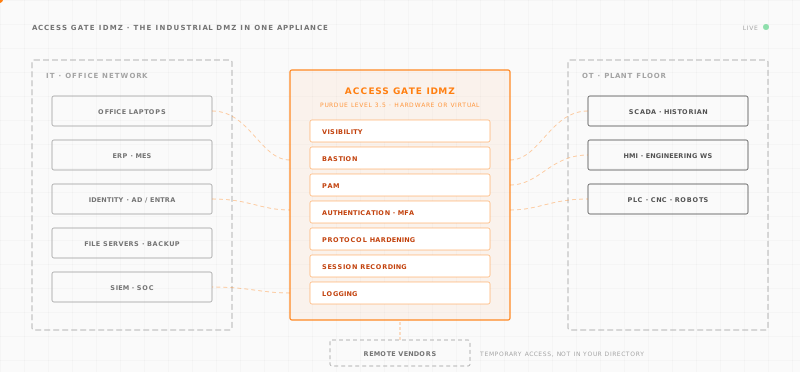
Access Gate IDMZ works with the firewall and switches you already run.
Keep your Fortinet, Cisco Meraki or Palo Alto firewall as the perimeter. Access Gate handles the OT side: per-machine access, vendor sessions and audit evidence.
The firewall change is small, a route or two. Each guide below gives the exact steps.


· Plants already running it

55
ski lift sites on one console, with no security staff
“Deploying Zero-Trust across our site - a ski resort - was not in the cards with our resources. Now we operate a ZT architecture with a simple centralized control. Game changer.”

5
OT protocols validated, with no change to the network
“Working with Trout, we validated Access Gate as a reference implementation of overlay security for brownfield OT. It added identity-based access, segmentation and audit evidence to a representative plant network without touching the underlay.”

4 h
per restricted environment, from install to enforced rules
“We have been using Trout solution's for over a year, in regards to homologating environments. The solutions are stable and innovative.”

100%
of CUI data flows secured, for CMMC Level 2
“Trout has been outstanding across the board, from the quality of their product to the responsiveness of their team. They've been a true partner in helping us meet our CMMC goals.”
Choose the Access Gate IDMZ that fits your site.
Every price includes hardware, software, updates and support.

Small
Access Gate Essential
$5,745 per site, per year
Best for a small site: a remote line, a substation or a pump station.
- Form factor
- 1/2U, fanless
- Capacity
- Up to 200 assets
- Setup
- Ships configured, plugs into the existing switch
- Data
- Stays on site

Large
Access Gate Performance
$11,240 per site, per year
Best for a main plant, or a site with heavy traffic.
- Form factor
- 1U rack, server-grade
- Capacity
- Up to 1,000 assets
- Duty
- Continuous, in a plant cabinet
- Data
- Stays on site

Virtual
Per core Contact sales
Best for a site that already runs a hypervisor between IT and OT.
- Runs on
- Your hypervisor
- Capacity
- Sized with you
- Data
- Stays on site
Questions about Access Gate IDMZ.
The only network change is one route on your existing router. Access Gate filters at the boundary, and your VLANs and cabling stay as they are.
An industrial DMZ, also called an IDMZ or OT DMZ, is a buffer zone between the office IT network and the OT network. It sits at Level 3.5 of the Purdue model. Only a few known flows cross it, such as the historian feed, patches and remote access. Each flow goes through a service in the DMZ. No traffic goes straight from IT to the control network. IEC 62443 treats it as a conduit between zones. Access Gate puts an industrial DMZ in one appliance.
Start with an industrial DMZ between the office network and the plant floor, so nothing reaches the machines directly. Then give each person named access with MFA, limit vendor sessions to one machine, and log every connection. Access Gate does all of this in one appliance that connects to your existing network. Setup takes a day.
You connect the equipment through an industrial DMZ, so IT and OT never talk directly. Every flow goes through the DMZ, where it is authenticated and logged. With Access Gate, the DMZ is one appliance beside your existing network. One route sends a machine's traffic through it.
A classic industrial DMZ is built from many parts. You need two firewalls, or a three-legged firewall, with new VLANs and IP addresses. You add a VPN and a jump server for remote access, a directory with MFA, and a protocol gateway for each application. The logs end up spread across all of them. Access Gate does the same jobs in one appliance. It filters every flow between zones, gives remote access through its bastion and asks for MFA before traffic reaches a machine. Its proxy inspects industrial protocols, and one tamper-evident log records every crossing. Your IT firewall stays the perimeter.
Yes. Your Fortinet, Meraki or Palo Alto firewall stays at the edge, between your company and the internet. Access Gate sits beside it and does the OT jobs: per-machine access, vendor sessions, industrial protocols and audit evidence. On a FortiGate the change is one route, one firewall policy and one policy route.
No. Access Gate connects beside your existing network. One route on your existing router sends a line's traffic through Access Gate. Your VLANs and cabling stay as they are. Production keeps running while you put the zone boundaries in place.
Access Gate applies the IEC 62443 model of zones and conduits. It also gives you the segmentation, access control and logging that NIST SP 800-82 recommends for OT. Every session between zones is tied to a named user. Each session goes into a tamper-evident log, so any change to the log shows. You collect audit evidence from the first session.
Small (Access Gate Essential) covers up to 200 assets: a remote line, a substation or a pump station. Large (Access Gate Performance) covers up to 1,000 assets: a main plant, or a site with heavy traffic. Virtual runs on your own hypervisor and is sized with our sales team.
Insert your industrial DMZ, without downtime.
Tell us about your site. We size Access Gate IDMZ with you and send the quote.