
Most plants deploy Access Gate in Lollipop mode: the gate sits beside your network, you add one route and one rule on your router, and your machines' traffic goes through it. Nothing changes on the machines. Choose In-Line only if you want the gate to carry your VLANs itself for the fullest coverage. Add Bastion for remote access and Multi-Site Mesh to connect several sites.
| Mode | What it does | How traffic reaches the gate | Choose it when |
|---|---|---|---|
| Lollipop (recommended) | Protects your machines from beside the network | One route and one rule on your router send traffic to the gate | You have a router or managed switch where you can add a rule. You want the least disruption. This is the quick start. |
| In-Line | Protects your machines from inside the traffic path | The gate carries your VLANs on a trunk and is your machines' gateway | You want the fullest coverage, or you have no managed switch |
| Bastion | Lets remote people in through one controlled door | VPN → Access Gate → machines | Remote operators, vendors, incident response |
| Multi-Site Mesh | Shares access to machines across sites | Encrypted links between Access Gates | Several plants, shared services, mergers and acquisitions |
Lollipop and In-Line are two points on the same dial: beside the network for low impact, in the path for the fullest coverage.
Lollipop mode (recommended)
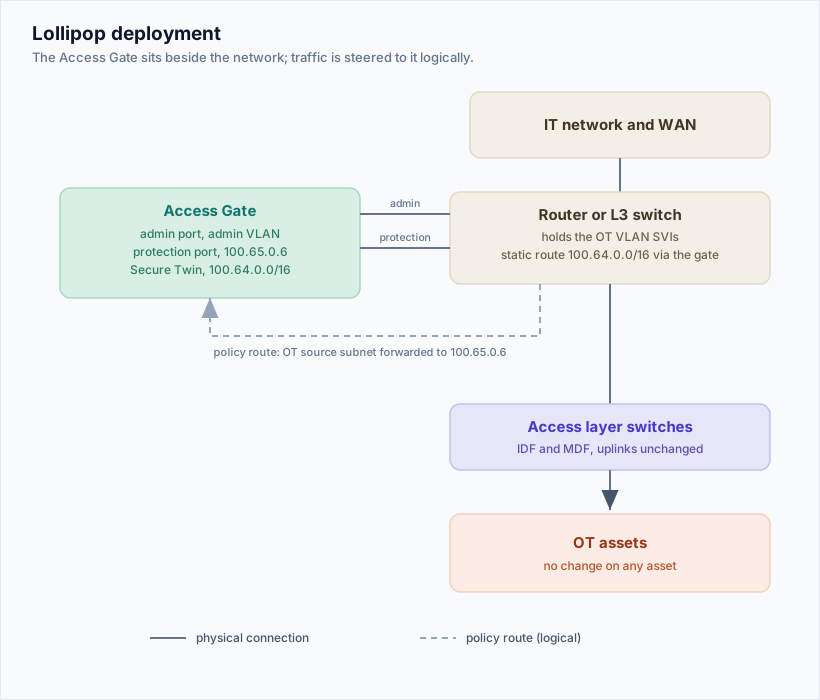
Access Gate connects beside your network instead of carrying its VLANs. Traffic is steered to it by a route and a rule on your router, not by re-cabling. Your routes, VLANs and addresses stay as they are, which keeps the change small on a running site.
How you set it up
- Connect the gate to your router with two cables: an admin cable and a protection cable on a small dedicated VLAN.
- Add one route on your router: the twin addresses (
100.64.0.0/16) go to the gate. - Add one rule: everything from your machine subnet goes to the gate first (source-based). To protect only some machines, use a route to their twin addresses instead (destination-based).
Nothing on the machines changes. To undo, remove the rule. To move one machine at a time instead, use names or twin addresses. See Choose how to connect your machines.
How traffic flows
Without Access Gate: Client → Machine
With Access Gate: Client → Access Gate → Machine
The client never reaches the machine directly. Access Gate ends the client's session and opens a second, separate session to the machine. Because every session goes through it, Access Gate can add sign-in, access control and session logs in front of machines that have none of their own.
What happens behind the scenes
- Visibility: Access Gate sees your traffic from a NetFlow feed from the router. NetFlow is for discovery and monitoring only, not for blocking. See Traffic monitoring and NetFlow export.
- Twin addresses: Access Gate gives each protected machine a twin address, usually in
100.64.0.0/16. - Steering: DNS can point machine names to their twin addresses, and routing sends that traffic through Access Gate.
- Your machines stay on their original network, unchanged.
Why it is low impact
- Nothing is added to the core traffic path.
- No physical network changes.
- Simple to deploy and to remove.
- The network keeps working if Access Gate is offline.
In-Line mode (fullest coverage)
The gate sits in the traffic path and carries your VLANs, routes and core switching itself. Choose it when you want the gate to control routes, VLANs and packet flows directly, or when you have no managed switch to steer traffic with.
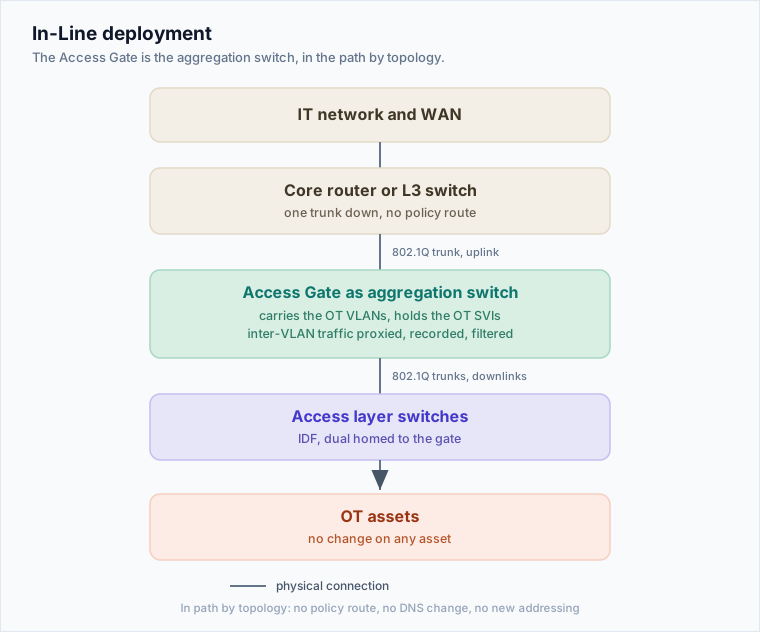
- Access Gate connects to your access switch (for example a Cisco Catalyst, Fortinet or Netgear switch) on a trunk port and carries those VLANs through the gate.
- Your machines use Access Gate as their gateway.
- Like any device in the traffic path, plan for availability, for example a high-availability pair.
Because the gate carries the VLANs, you can give machines a twin address that lets Access Gate control their traffic. Machines reach the twin in one of two ways:
- On the machine, by using the twin address directly.
- With NAT between VLANs.
Machines can still talk to each other over their real addresses if that traffic never reaches the gate. See below.
Traffic between machines on the same VLAN
Two machines on the same VLAN talk through the switch and never reach the gateway. To control that traffic, use one of these:
- A twin address on the flows you want to protect, for example a gateway system talking to a collector.
- Passive listening only. This is the recommended case for time-critical or broadcast systems, where an extra routing hop would break timing or multicast.
- Move one system to another VLAN, for example a SCADA station, and put an ARP proxy on Access Gate in its original VLAN.
Bastion mode (remote access)
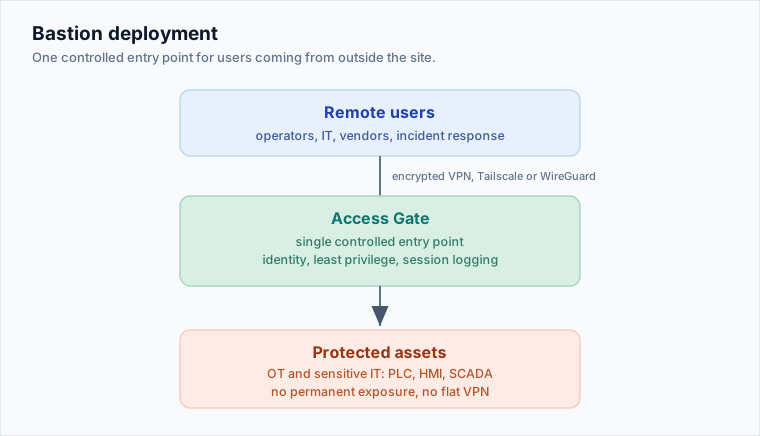
Access Gate becomes the single controlled door for people coming from outside the site. Remote users connect over a VPN (Tailscale or WireGuard) to Access Gate, and Access Gate opens each session to the machines they are allowed to reach. See Remote zero trust access and Privileged access management.
Remote users → VPN (Tailscale / WireGuard) → Access Gate → Protected machines
The problem it solves
Remote access to a plant usually ends up as a flat VPN into the network, a jump box or RDP server, or a vendor's own remote tool. Bastion mode replaces those with:
- Access to only the machines each person needs.
- One clear boundary.
- A record of every session.
- Vendor access that does not stay open after the job.
Choose it when
- Operators, IT, vendors or incident responders need remote access.
- You do not want a VPN to mean "inside the whole network".
- You need logs and evidence for NIS2, CMMC or NIST controls.
Multi-Site Mesh (several sites)
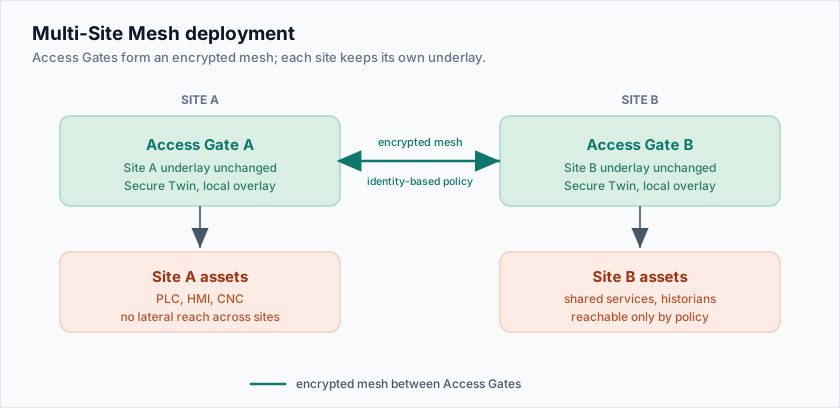
Several Access Gates link up over encrypted connections. Each site keeps its own network unchanged, and selected machines or services become reachable from other sites, by identity and policy.
Site A machines ← Access Gate A ←→ Access Gate B → Site B machines
The problem it solves
Companies with several sites often end up with flat site-to-site VPNs, complex network engineering and different controls at each site. The mesh gives you:
- Zero trust across sites: Alice on site A gets access to one specific CNC on site B, checked by identity, with no reach to anything else. See Cross-site entity sharing.
- The same security rules at every site.
- Faster rollout.
- One set of logs and documentation for auditors.
Typical uses
- A central engineering team needs controlled access to machines across plants.
- Shared services (historians, patch servers, backup, monitoring) must be reachable safely.
- Mergers or multi-entity companies, where networks stay separate but people need to work together.
- You want access decided by policy, not by how the network is routed.
Requires: the Site Mesh feature. See Cross-site entity sharing.