
Your inventory is the list of your machines, each with a name you recognize, like Line 2 PLC or Packaging HMI. Access Gate finds the machines from your network traffic, without scanning them, and you register the ones you want with a click.
How Access Gate finds your machines
Access Gate listens to a copy of your traffic: NetFlow records from your router (see Configure the monitoring port). It never scans your machines, so it is safe on a running line.
From that traffic it collects:
- MAC addresses
- IP addresses
- Ports and protocols
- Traffic patterns
It reads metadata only. It does not inspect the content of the traffic.
Access Gate can also follow DHCP traffic on an interface. This keeps addresses up to date when machines get them from DHCP and leases change, for example on mixed IT/OT networks. Added in v26.3.1.
See what was found
Every machine Access Gate sees appears on the Monitor page, with:
- Its IP addresses
- Its name
- Its type
- Upload and download traffic
- The protocols it uses
- Its location
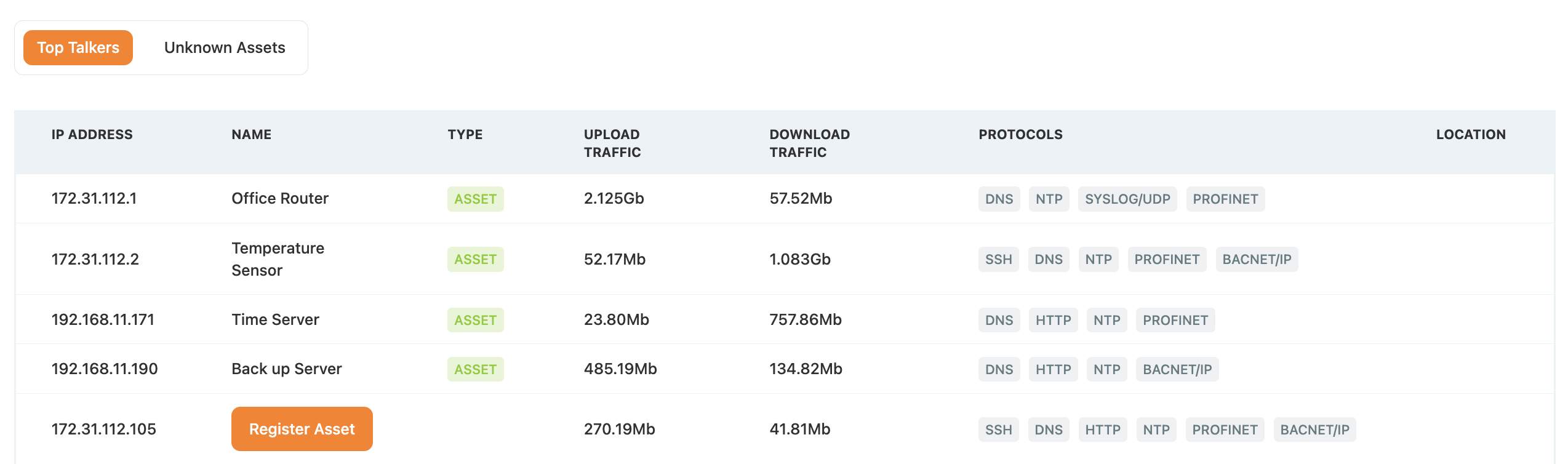
The Monitor page in a lab
Monitor is for visibility: a live, read-only view of what is on your network, including machines that are not in your inventory yet. You build the inventory in Assets.
Register a machine
- In Monitor, find the machine and note its IP address.
- Open Assets and click Create Asset, top right.
- Give it a name you recognize, for example Line 2 PLC, and add its IP address.
- Add a role or description if you want, then save.
The machine is now in your inventory, and you can use it everywhere in Access Gate.
Next step
Put your machines into enclaves, so you decide who may reach them. See Protect a machine with an enclave.