
Access Gate gives each of your machines a twin address beside its real one. People and systems reach the machine through its twin address, so their traffic passes through Access Gate. The machine keeps its real address, and nothing changes on it or on your network.
Twin addresses in plain words
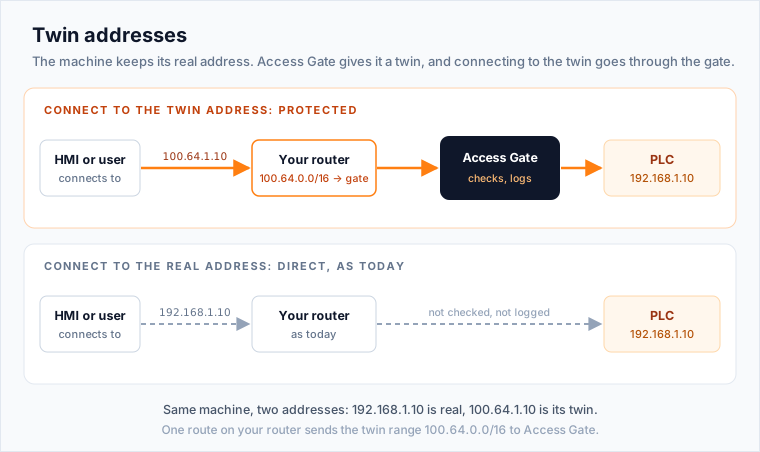
- Your real network stays as it is. Your machines keep their addresses, VLANs, switches and firewalls.
- Access Gate adds a second set of addresses, the twin addresses, usually in
100.64.0.0/16. Each protected machine gets one. - Traffic sent to a twin address goes through Access Gate first. Access Gate checks who is asking, logs the session, and only then passes it to the machine's real address.
One route on your router tells it that the twin addresses live behind Access Gate. In the quick start, that is the route from 100.64.0.0/16 to 100.65.0.6.
The technical name for this is an overlay network: a logical network on top of your existing one, which is called the underlay. Only the traffic you want to protect uses the overlay.
| Your real network (underlay) | Twin addresses (overlay) | |
|---|---|---|
| What it is | Your existing plant or office network | Addresses owned by Access Gate |
| Addresses | Your machines keep theirs | A separate range, usually 100.64.0.0/16 |
| Changes | None: switches, VLANs and firewalls stay the same | Added beside your network, no rewiring |
| What uses it | All your existing traffic | Only the access you protect |
| Who is trusted | Anyone on the same segment | Only people and systems allowed in an enclave, checked by Access Gate |
Your machines stay where they are. Access control happens on the twin addresses.
How Overlay Routing Works
Every protected communication has two legs, one in the overlay, one in the underlay, and Access Gate translates between them. For every session, one leg is always still in the existing network, which is why assets never need to be re-IP'd or moved.
- Inbound (client → asset). The client sends a packet with source = its own underlay IP and destination = the asset's overlay IP. Routes on the existing network steer overlay-destined traffic to Access Gate.
- NAT at the gateway. Access Gate terminates the connection, applies policy, and opens a new session toward the asset's underlay IP. The source on this new session is Access Gate's own underlay IP (a NAT). The asset never sees the overlay address, from its perspective the traffic comes from another underlay device.
- Outbound (asset → client). The asset replies to Access Gate's underlay IP. Access Gate maps the reply back onto the original overlay session and returns it to the client with source = the overlay IP, destination = the client's underlay IP.
The asset-side leg is always in the underlay. The overlay only exists between the client and Access Gate. That is the property that lets Access Gate add identity-enforced access in front of legacy assets without touching their addressing or the underlay topology.
The recommended way to send traffic into the Secure Twin is one route on your existing router or switch. The route is either source-based, matching a subnet's traffic, or destination-based, matching the machines. Nothing on the machines changes, and removing that one line is the rollback. Twin DNS and Twin IPs are alternatives when you want to move a single machine or cannot add a route. See Choose how to connect your machines.
Why Access Gate Uses an Overlay
Traditional security approaches rely on inline devices, VLAN segmentation, or flat VPNs. These approaches introduce risk in operational environments.
Overlay networking avoids those pitfalls:
- No Inline Risk (adjacent model)
- In the adjacent model, Access Gate does not sit in the physical traffic path
- No single point of failure
- Production traffic continues even if Access Gate is offline
- No Network Redesign
- No VLAN changes
- No IP reassignments
- No switch or router reconfiguration beyond routing to Access Gate
- Access Control
- Clients never connect directly to assets
- All protected access flows through the Access Gate proxy
- Authentication, authorization, and logging are enforced centrally
This overlay approach is especially interesting when you have a network already in place, legacy configuration that are difficult to move.
What the Overlay Enables
Overlay networking allows Access Gate to enforce:
- Identity-based access (who can reach what)
- Time-bound and task-based permissions
- Protocol-aware proxying (HTTP, RDP, SSH, SMB, industrial protocols)
- Full session logging and traceability
- Rapid isolation or revocation without touching the network
All without changing how your network is physically built.
Because the Access Gate stack is a VM you own on x86 hardware, its security is decoupled from any fixed appliance. That means the same host that fronts the overlay can also run secure services that pull OT in: remote access, protocol gateways, DNS and time, file sharing, a historian, or an update server. The overlay becomes the controlled front door not just to legacy assets, but to hosted services you place alongside them.
Overlay Networking vs VLANs + Firewall
| Dimension | VLAN Segmentation | Overlay Networking |
|---|---|---|
| Network changes | Requires redesign | Minimal changes |
| Trust model | Static boundaries | Identity-based policies |
| Auditability | Hard to audit | Full access logging |
| OT suitability | Risky | Great fit |
Overlay networking shifts security from network topology to policy and identity.
Key Takeaway
Overlay networking lets you add security, control, and compliance on top of existing IT and OT networks, without disrupting operations.
It is the foundation that allows Access Gate to be:
- Non-intrusive
- Agentless
- Safe for production
- Aligned with NIS2, CMMC, and Zero Trust principles