
When you can change what an asset talks to, the most direct way to bring it under Access Gate is to point it at its peer's Secure Twin address. The asset keeps sending traffic exactly as before, but the destination is now an overlay IP that routes through the Access Gate for policy enforcement before reaching the real device.
This is the most explicit of the four deployment methods: you change one thing on the asset, its destination address, and everything else follows from routing.
The Goal
Some assets can be reconfigured. An HMI, a SCADA client, or a historian often stores the address of the server it talks to in a plain configuration field you are allowed to edit. When that is true, you do not need Layer 2 tricks or DNS: you simply tell the asset to talk to its peer's overlay address instead of its underlay one, and let the Access Gate translate the flow back.
The effect is the same as every other Secure Twin method, the sensitive assets keep their own IP, gateway, and routing, and the underlay network is untouched, but here the interception is fully explicit. Nothing is spoofed. The asset is knowingly pointed at the overlay, and the operator can see exactly where its traffic goes.
How It Works
Three pieces work together, none of them on the underlay network itself:
- The overlay range defines a 1:1 mapping (a "binat") between each underlay address and its Secure Twin overlay address. In this lab it is last-octet-preserving:
10.0.0.Xon the underlay corresponds to100.64.100.Xon the overlay. - The asset's destination is changed from the peer's underlay IP (
10.0.0.3) to its overlay IP (100.64.100.3). This is the only change made to any device. - A route carries the overlay range to the Access Gate. In an adjacent (lollipop) deployment the router forwards it; in an in-line deployment the gate carries it natively. Access Gate maps the overlay address back to the real device, enforces enclave policy, and delivers the flow.
Because only the destination address changes, the asset's own IP, its gateway, and its neighbor logic are all left exactly as they were.
Reference Lab
The example below reuses the same flat device subnet as the ARP proxying guide: a host behind a Router, with the Access Gate reachable over the overlay in a lollipop architecture.
| Element | Address | Role |
|---|---|---|
| zt-a | 10.0.0.4 | Legacy device A (source), reconfigured to target the overlay |
| zt-b | 10.0.0.3 | Legacy device B (target) |
| Router | 10.0.0.1 | Edge gateway and route to Access Gate |
| Access Gate | 100.65.0.4/29, Secure Twin 100.64.100.4/24 | Overlay identities, policy enforcement |
The mapping is last-octet-preserving: 10.0.0.X on the local subnet corresponds to 100.64.100.X on the overlay, so zt-b (10.0.0.3) is reachable as 100.64.100.3.
Step by Step
1. Define the overlay range
The overlay range is a range of addresses reserved for assets protected by Access Gate, each overlay address mapping 1:1 to one underlay address. The default is 100.64.0.0/16, part of the CGNAT reserved range, so it should not conflict with existing IPs. Overlay ranges are defined in the Access Gate user interface:
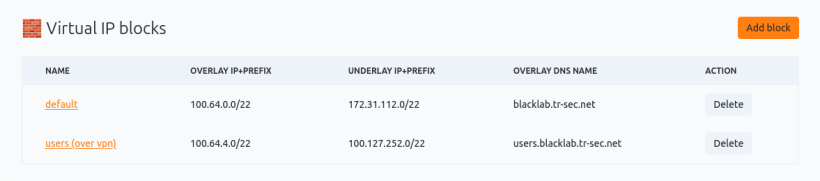
For the binats to be functional, the overlay and underlay masks must match in size and the ranges must not overlap. In this lab the overlay 100.64.100.0/24 maps to the underlay 10.0.0.0/24.
2. Configure the Secure Twin port
The Secure Twin port is the interface on which Access Gate receives overlay traffic and returns it to the underlay. On the settings page, select the port type:
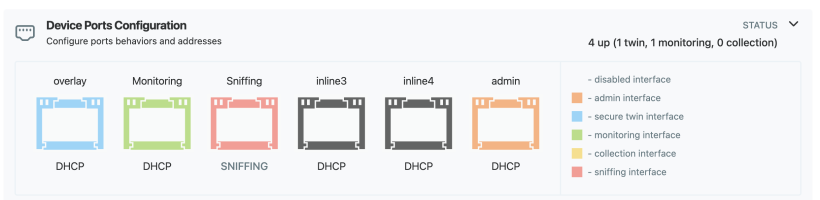
Then enter the interface values for the segment:
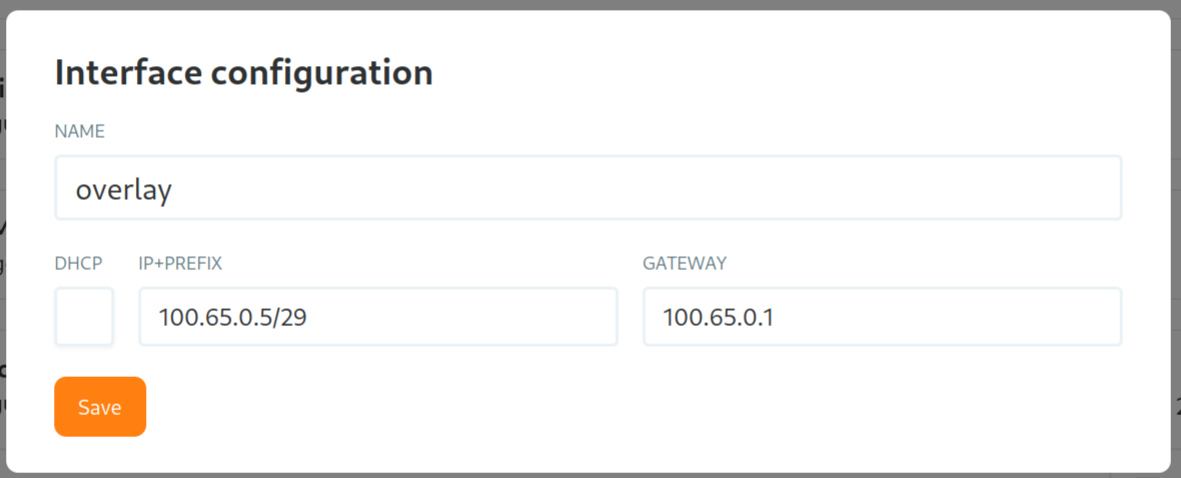
An ICMP ping to the interface confirms it is up before you steer any traffic to it.
3. Point the asset at its Secure Twin address
This is the one change on the device. Wherever zt-a stores the address of its peer, its application configuration, HMI connection target, or client settings, replace the underlay IP with the overlay one:
zt-a's target for zt-b: 10.0.0.3 -> 100.64.100.3
4. Route the overlay range to the Access Gate
The asset now sends to an overlay address, so the network needs to forward that range to Access Gate. In an adjacent (lollipop) deployment, add a route on the router; in an in-line deployment the gate already carries the range and this step is native.
# On the router: forward the overlay range to the Access Gate
ip route add 100.64.100.0/24 via <access-gate-ip>
If you would rather the router perform this redirection instead of the asset, see Deploy Secure Twin via Gateway NAT (L3).
5. Verify the full path
zt-a reaches its peer at the overlay address, and the traffic now travels through the Access Gate rather than switching directly on the subnet. The Access Gate maps 100.64.100.3 back to the real zt-b (10.0.0.3), applies policy, and returns the reply. A reduced TTL on the response confirms the flow traversed the gate rather than staying local.
The Complete Path
zt-a (10.0.0.4)  [target set to 100.64.100.3]
  -> Router (10.0.0.1)  [route 100.64.100.0/24 -> Access Gate]
  -> Access Gate (Secure Twin 100.64.100.4/24, policy enforcement)  [maps 100.64.100.3 -> 10.0.0.3]
  -> zt-b (10.0.0.3)
  -> and back, un-translated to zt-a
From zt-a's point of view, it opened a session to a single, explicit destination. In reality every frame passed through the Access Gate for inspection and policy enforcement, with no change to zt-a's own address, gateway, or routing, and none at all to zt-b.
The Most Explicit Path to Zero Trust
Modifying the destination IP is the most transparent way to bring an asset under the Secure Twin: there is nothing to spoof and nothing hidden, the asset is simply told where to send its traffic. It is the right choice when you own the asset's configuration and want the interception to be visible in the device itself.
When you cannot touch the asset at all, reach for ARP proxying (L2) to achieve the same result at Layer 2, or DNS to steer by name instead of address. All four methods bring legacy assets under Zero-Trust enforcement while production stays online and the underlay network is left untouched.