
Access Gate utiliza el protocolo NTP para sincronizar su reloj de software. Un reloj correcto es fundamental para las marcas de tiempo de los registros, así como para la autenticación de certificados y túneles.
Por lo general, no es necesario configurar NTP, ya que Access Gate se autoconfigura basándose (1) en la información recibida de una concesión DHCP en su puerto Overlay, o (2) utiliza el valor predeterminado time.google.com si no se ha definido ninguno.
Verificar las reglas de firewall existentes para el acceso WAN de Access Gate
Las solicitudes NTP se envían a través de la interfaz overlay (no a través de las interfaces de monitoreo, administración u otras). Asegúrese de que las reglas de firewall existentes permitan la conectividad WAN saliente desde el puerto overlay de Access Gate.
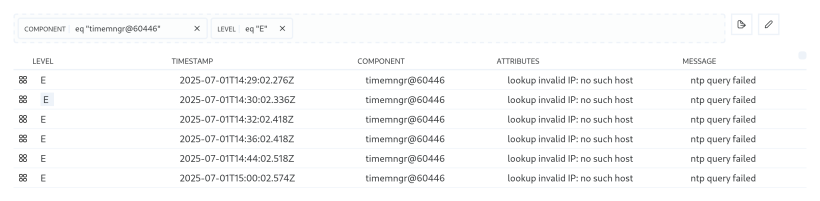
Para buscar posibles errores de configuración en los registros, utilice la consulta eq "timemngr@60446" [component] y eq "E" [level]:
Como ejemplo de configuración de NTP en un router:
/ip/dhcp-server-network
 add address=100.65.0.0/29 gateway=100.65.0.1 ntp-server=100.65.0.2