
To deploy a Secure Twin via ARP NAT, isolate the two device ports on the switch, let a redirection element answer ARP on the peer's behalf using private-VLAN proxy ARP, then destination-NAT the captured traffic onto the overlay and route it to the Access Gate. The end devices are never reconfigured. This needs managed switches you administer, so it is a best-effort method.
Sometimes you cannot modify a destination IP or NAT at the router level, but you do control the switching layer. Where that is the case, private VLAN and proxy ARP can steer East-West traffic into the Access Gate secure overlay without changing the end devices, their gateway, or their routing.
The devices keep behaving as if they are talking to a neighbor on the same subnet, while every packet is pulled through the overlay for policy enforcement.
What problem does ARP NAT solve?
Legacy OT and IT equipment cannot be reconfigured casually. You often cannot change a PLC's IP, install an agent, add a static route, or point it at a new gateway, either because the vendor forbids it, the change window does not exist, or the device simply predates the idea. Yet these are exactly the assets that need protecting, and the East-West traffic between them is exactly what a flat network leaves wide open.
Traffic Redirection solves this at Layer 2. Two devices on the same subnet normally ARP for each other and switch frames directly, invisible to any security control. Trout inserts itself into that exchange by answering the ARP on the target's behalf, so the source device sends its frames to the Access Gate path instead of the peer, believing nothing has changed. The Access Gate then translates the flow onto the overlay, enforces enclave policy, and delivers it.
The end devices are left alone. That is the trade this method makes: it moves the configuration work off the assets and onto the switching layer, where port isolation and proxy ARP have to be set up and maintained. Nothing is avoided outright, it is relocated to the place you are able to change. Where the monitoring port gives passive visibility, redirection adds active control, and both leave the protected assets as they are.
How does ARP NAT work?
The redirection relies on three mechanisms working together. All of them are configured on the switching layer and the redirection element, none on the end devices:
- Port isolation removes the direct Layer 2 path between the two devices, so their frames can no longer be switched to each other.
- Proxy ARP (private-VLAN mode) lets the redirection element answer ARP requests for the isolated peer with its own MAC address, capturing the frame the device thinks it is sending to its neighbor.
- Destination translation rewrites the captured traffic from the local address to its overlay identity and routes it to the Access Gate, which maps it back to the real device and returns the reply.
Because the interception happens at Layer 2, the end devices never learn that anything changed. Their IP configuration, their gateway, and their neighbor logic are all left exactly as they were. Only their ARP table quietly updates to point the peer's IP at the redirection element's MAC.
Reference Lab
The example below uses a host sitting behind a Router. It is representative of a real deployment: a flat device subnet served by the firewall, with the Access Gate reachable over the overlay in a lollipop architecture.
| Element | Address | Role |
|---|---|---|
| zt-a | 10.0.0.4 | Legacy device A (source) |
| zt-b | 10.0.0.3 | Legacy device B (target) |
| Redirection element | 10.0.0.2 on bridge | Intercepts and translates |
| Router | 10.0.0.1 | Edge gateway and route to Access Gate |
| Access Gate | 100.65.0.4/29, Secure Twin 100.64.100.4/24 | Overlay identities, policy enforcement |
The mapping is last-octet-preserving: 10.0.0.X on the local subnet corresponds to 100.64.100.X on the overlay.
How to deploy a Secure Twin via ARP NAT (L2), step by step
1. Confirm the starting state
Both devices sit on the same bridge and can reach each other directly. This is the flat, unprotected baseline.
ping -c2 10.0.0.3 # succeeds: direct L2 switching
2. Remove the direct Layer 2 path
Isolate the two device ports on the bridge so their frames can no longer be switched to each other. The redirection element's port and the uplink stay non-isolated, so both devices can still reach them.
# host-side veth for each container, set on the bridge
sudo ip link set {} type bridge_slave isolated on             # zt-a
sudo ip link set veth6680885b type bridge_slave isolated on   # zt-b

# verify
bridge -d link show | grep -B1 isolated
Confirm the shortcut is broken. The peer no longer answers ARP, so the neighbour entry stays incomplete:
ping -c2 10.0.0.3      # fails: INCOMPLETE ARP
ip neigh show          # 10.0.0.3 ... INCOMPLETE
3. Answer ARP on the peer's behalf
Give the redirection element an address on the bridge, then enable private-VLAN proxy ARP so it can reply to ARP requests for the isolated peers. Standard proxy ARP refuses to answer for an address on the same interface as the requester; proxy_arp_pvlan is the setting built for isolated (private-VLAN) segments and permits exactly that reply.
sudo ip addr add 10.0.0.2/24 dev zt-lab
sudo ip link set zt-lab up

sudo sysctl -w net.ipv4.ip_forward=1
sudo sysctl -w net.ipv4.conf.zt-lab.proxy_arp=1
sudo sysctl -w net.ipv4.conf.zt-lab.proxy_arp_pvlan=1

sudo ip neigh add proxy 10.0.0.3 dev zt-lab
sudo ip neigh add proxy 10.0.0.4 dev zt-lab
Now the source device resolves its peer to the redirection element's MAC:
ip neigh show
# 10.0.0.3 dev eth0 lladdr 00:16:3e:84:aa:ba REACHABLE
The device thinks it found its neighbor. It actually found Trout.
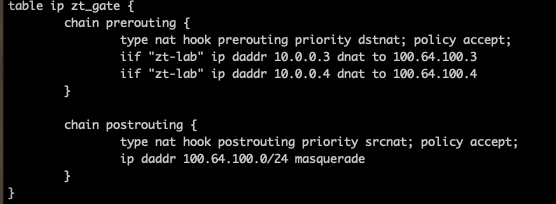
4. Translate to the overlay
Rewrite traffic destined for the local peer address to its overlay identity, and masquerade so the reply comes back to the redirection element to be un-translated. The end devices stay entirely in local-subnet terms.
sudo nft add table ip zt_gate
sudo nft add chain ip zt_gate prerouting '{ type nat hook prerouting priority dstnat; }'
sudo nft add rule ip zt_gate prerouting iif zt-lab ip daddr 10.0.0.3 dnat to 100.64.100.3
sudo nft add rule ip zt_gate prerouting iif zt-lab ip daddr 10.0.0.4 dnat to 100.64.100.4
sudo nft add chain ip zt_gate postrouting '{ type nat hook postrouting priority srcnat; }'
Example of configuration
5. Route to the Access Gate through the firewall
Send the overlay range to the Access Gate via the subnet's own gateway, so the traffic egresses on the interface built for this segment rather than borrowing another path.
sudo ip route add 100.64.100.0/24 via 10.0.0.1 dev zt-lab metric 50

# confirm the path
ip route get 100.64.100.3
# 100.64.100.3 via 10.0.0.1 dev zt-lab src 10.0.0.2
6. Configure the Access Gate overlay
On the Access Gate side, create a network matching this subnet, with an associated overlay.

As well as the assets that you want to protect.

7. Verify the full path
The device pings its "neighbor" and it works, but the traffic now travels through the Access Gate.
sudo tcpdump -ni enp6s0 host 100.64.100.3 &
ping -c3 10.0.0.3
sudo pkill tcpdump
Expected capture:

The traffic leaves the redirection element as 10.0.0.2 -> 100.64.100.3, reaches the Access Gate through the firewall, and returns. The reduced TTL confirms it traversed the gate rather than switching directly.
What the full traffic path looks like
zt-a (10.0.0.4)
  -> bridge  [ARP answered by Trout, not the peer]
  -> redirection element (10.0.0.2)  [DNAT 10.0.0.3 -> 100.64.100.3, masquerade]
  -> Router (10.0.0.1)
  -> Access Gate (100.64.100.3, policy enforcement)
  -> and back, un-translated to zt-a
From the device's point of view, it pinged a neighbor on its own subnet. In reality, every frame passed through the Access Gate for inspection and policy enforcement, with no change to the device's address, gateway, or routing.
When to use this, and when not to
Because the redirection is built on ARP and Layer 2 isolation, the protected devices are never reconfigured. There is no agent on the asset, no new gateway, no static route, and no downtime for the devices themselves. Legacy equipment that cannot be touched is brought under Zero-Trust enforcement using switch features that are usually already there.
This fits when you administer the switches, they support port isolation or private VLAN, you can get a change window on them, and the router and device addressing are genuinely off limits.
Use another way when the switches are unmanaged or belong to another team, the platform does not support private VLAN, the segment spans switches from several vendors with inconsistent isolation behaviour, or you have no appetite for a Layer 2 change that will need documenting and maintaining. In those cases start with the recommended ways instead: Twin DNS or Twin IPs to migrate one asset at a time, Source-Based Routing to move a whole subnet in one change. IP NAT (L3) is the other best-effort method, and it applies where there is a routed hop in the path. See Choose how to connect your machines.
Treat this as one technique to reach for when the conditions above hold, not as a default for every deployment. It should also be documented in the network's own runbook: an operator debugging ARP tables months later needs to know why a peer resolves to the redirection element's MAC.