
OPC UA is the protocol industrial equipment uses to talk to software, and it is almost always reachable, plaintext, and unauthenticated as the field runs it. Access Gate puts identity, policy, and encryption in front of an OPC UA server without changing the server or the client. This page explains the protocol briefly, then walks an end-to-end runbook that takes an exposed server and secures it.
For the security model behind these settings, which modes and policies to choose, and how certificates are validated, see Securing OPC UA.
Overview of OPC UA
OPC UA (Open Platform Communications Unified Architecture) is the standard protocol that industrial equipment uses to talk to software. A PLC running a pump, a sensor reading a tank level, a motor drive, a SCADA system, a historian, all of it speaks OPC UA to exchange data. It is the lingua franca of the factory floor, water plants, energy sites, and OT environments generally.
A server, usually sitting on or near the equipment (like a KEPServerEX instance), exposes an address space: a tree of nodes representing real-world values. Each tag, like Motor1.RPM or Tank1.Level_pct, is a node you can read, and often write. Clients (engineering laptops, SCADA, dashboards) connect over TCP, typically port 4840, to read those values, subscribe to live changes, or write new setpoints.
End-to-end runbook: securing an unsecured OPC UA server
This is a staged demo that takes an unsecured OPC UA server (KEPServerEX, SecurityPolicy=None, anonymous) and shows how Access Gate protects it without touching the legacy server or the client. It runs in two fixed acts, then branches into one of three Act 3 paths depending on what the client and the Gate support.
Endpoints and tags used throughout:
EP_DIRECT  = opc.tcp://172.31.144.41:4840/kepware/                 (raw server, underlay)
EP_GATE    = opc.tcp://kepware.bluelab.ts-sec.net:4840/kepware/    (via the enclave, by name)

RPM        = ns=2;i=2     Motor1.RPM
TEMP       = ns=2;i=3     Motor1.Temp_C
TANK       = ns=2;i=4     Tank1.Level_pct

ROOT_CA    = ~/Downloads/troutzt_root.cert                         (Trout Access Gate root)
Act 1: the exposure (underlay, no protection)
The server as the field runs it: reachable, plaintext, anonymous, writable.
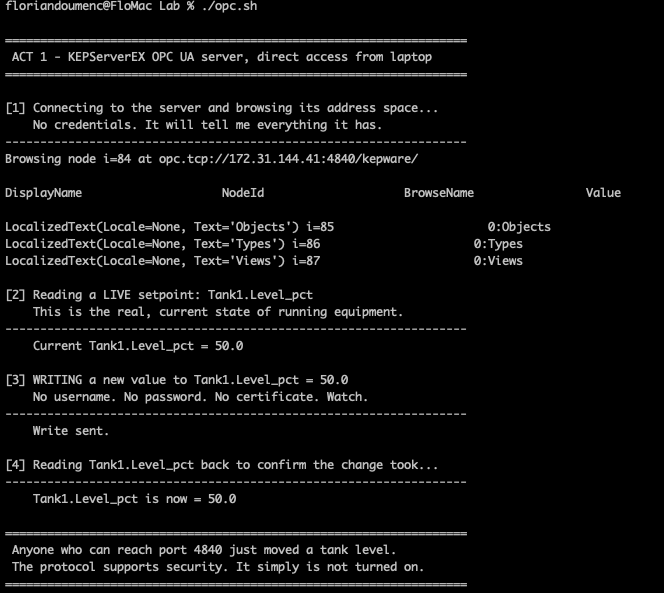
Anyone who can reach port 4840 reads every value and moves setpoints. No username, no certificate.
Act 2: create the enclave (overlay)
Bring the server inside an Access Gate enclave so it is reachable only through the overlay, by name, for an authorized identity. The legacy server is unchanged.
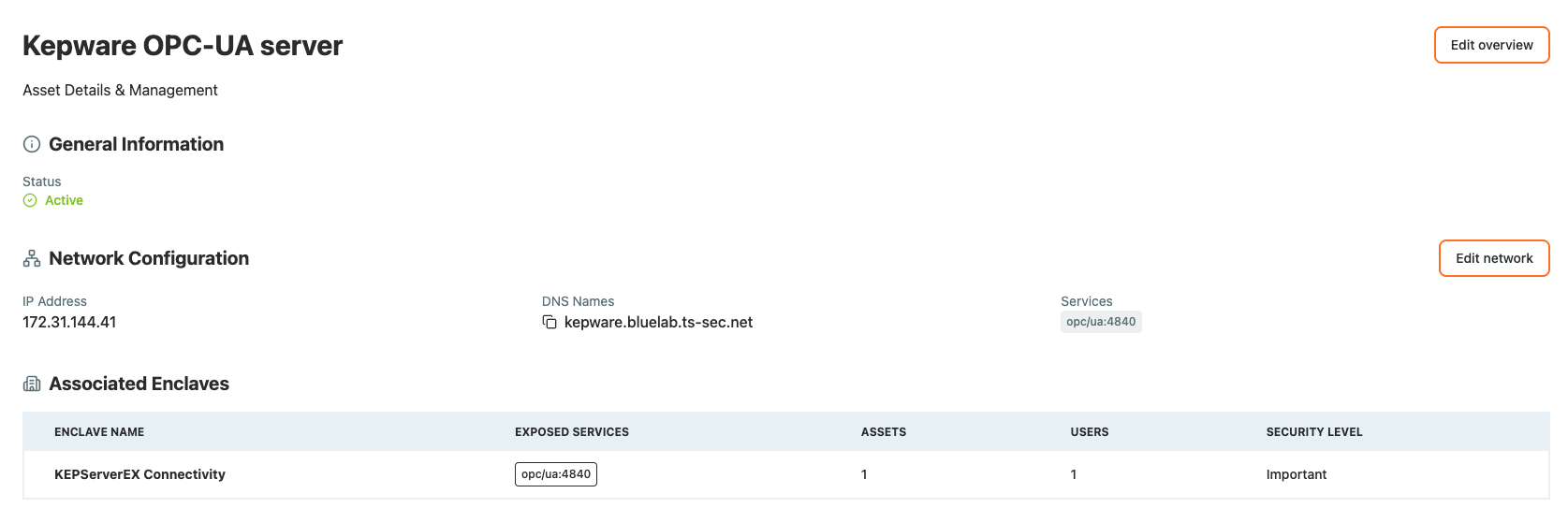
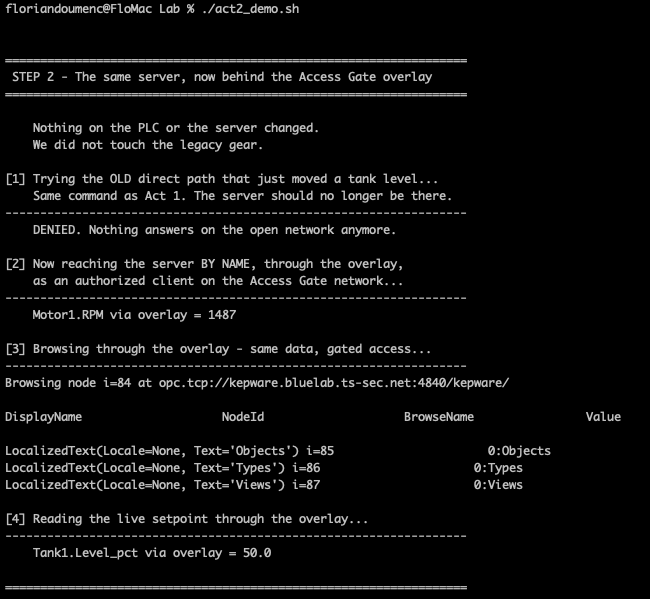
Nothing on the PLC or the server changed. The server now sits behind the Gate, reachable through the overlay rather than on the flat network. Access is gated to an identity and logged.
Act 3: secure the channel (pick one path)
The three paths below are mutually exclusive. A given client uses exactly one, depending on what the client and the Gate support. Decide up front and run only that path.
Path A: TLS tunnel (client speaks TLS)
Use when the client can terminate TLS to the Gate, or you place a local TLS terminator on the client machine so the plaintext segment never leaves the host.
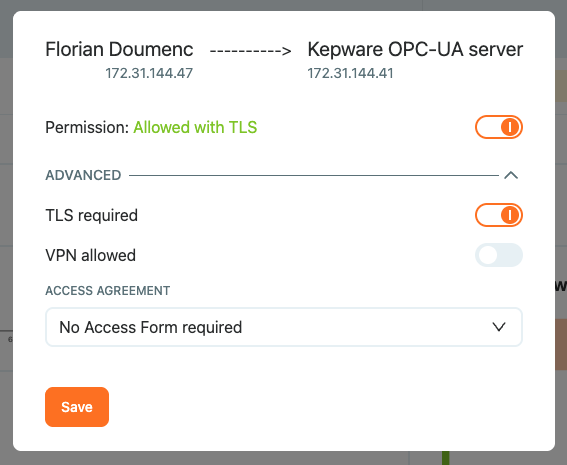
Check the Gate's TLS endpoint:
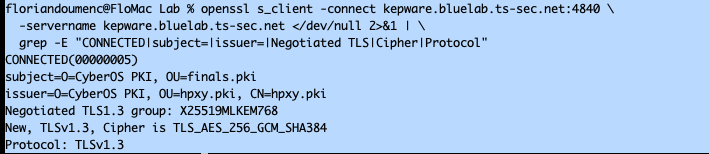
The channel to the Gate is TLS 1.3 with post-quantum key exchange (ML-KEM-768), verified against our own PKI, in front of a PLC that speaks none of that. For how the Gate provisions certificates, negotiates cipher suites, and enforces a "TLS only" policy, see Set up TLS encryption.
OPC UA also defines its own TLS-based mappings (opc.https and opc.wss) in the standard.
When to choose A: you have TLS-capable client or can accept a local terminator. This is the most advanced and flexible security solution if you can.
Path B: OPC UA message security
Here encryption happens at the OPC UA message layer rather than at a TLS tunnel, and Access Gate provides the DNS connectivity, ACL controls, and logging around it.
OPC UA message security runs inside the protocol's SecureChannel. To turn it on, set both endpoints to a current security policy and a message security mode:
- Security policy:
Basic256Sha256(or a newerAes*policy if both ends support it). Avoid the deprecatedBasic128Rsa15andBasic256. - Message security mode:
SignAndEncrypt.Signalone proves integrity but leaves the payload readable; onlySignAndEncryptgives confidentiality. - Certificates: client and server exchange X.509 application instance certificates and check each against their trust list, so the channel is mutually authenticated.
Encryption here is RSA and AES per the chosen SecurityPolicy suite, standards-native and mutually authenticated, not the post-quantum TLS suite from Path A.
When to choose B: your server and client support OPC UA message security and not TLS, and you want a standards-native, mutually authenticated channel with no terminator.
Path C: plain tunnel through the Gate (fallback)
Use when the client cannot do TLS and client and server cannot terminate an OPC UA SecureChannel. The Gate carries the session. The client speaks plain opc.tcp to the enclave endpoint, unchanged.
Even with no client-side or message-layer cryptography available, the server is no longer on the open network. Reaching it requires being an authorized identity on the overlay, and every session is gated and logged. This is the minimum posture: access control and audit via the enclave, without changing the legacy client or server.
Recap
We took an exposed OPC UA server, brought it inside an enclave so it is reachable only by an authorized identity over the overlay, then secured the channel with one of three options: a post-quantum TLS tunnel (Path A), standards-native OPC UA message security (Path B), or a gated plain tunnel that still delivers access control and audit (Path C).
Reach for this when an OPC UA server is reachable, plaintext, and anonymous on the network, and you need identity, encryption, and logging in front of it without touching the equipment.