
Every TLS tunnel Access Gate builds, and every trusted certificate it presents instead of a browser-warning self-signed one, rests on a PKI (public key infrastructure). The PKI is the chain of trust that lets a client verify it is really talking to the gate, and lets the gate issue certificates for the assets it protects. This page explains why that matters, why PKI is usually the hard part, and the two ways to deploy it with Access Gate.
Why a PKI matters
A certificate on its own proves nothing; what makes it trustworthy is the authority that signed it. A PKI is that authority and the machinery around it: it issues certificates, vouches for them through a signing chain, and gives every party a way to check that a certificate leads back to a root they trust.
Without one, you are left hand-managing self-signed certificates device by device. Each new device means another untrusted certificate, another browser warning, and another operator trained to click through the warning that is supposed to stop a man-in-the-middle. A PKI replaces that with a single trust anchor: trust the root once, and every certificate beneath it is trusted automatically.
Why PKI is hard
The cryptography is not the problem. The lifecycle is. A real deployment has to solve all of these at once:
- Issuance and distribution. Every endpoint needs the right certificate, and every client needs to trust the issuer. Getting the right material to the right place, at scale, is the bulk of the work.
- Trust lists. Both sides must trust the chain. One missing intermediate or untrusted root and the connection is rejected, often with an opaque error.
- Rotation and expiry. Certificates expire by design. An expired certificate is an outage, and renewing certificates by hand across a fleet is slow and error-prone, so it slips.
- Revocation. When a key is compromised, you need a way to pull trust from its certificate before the attacker uses it.
- Scale in OT. Field devices often cannot run a certificate agent, or cannot be touched at all. Per-device PKI is simply impractical for the equipment that needs it most.
This is why so many facilities under-deploy encryption. Not because TLS is hard, but because owning the certificate lifecycle for hundreds of devices is.
How Access Gate's PKI works
Access Gate runs a PKI by default and uses a two-level certificate model that moves the lifecycle off the devices and onto the gate:
- An intermediate certificate, signed by your certificate authority, that never leaves the device.
- Terminal certificates, generated on the fly from the intermediate and handed to assets and clients to establish each secure tunnel.
Because terminal certificates are minted on demand at the gate, you do not provision certificates device by device. The gate becomes the issuance point, and the legacy assets behind it stay untouched. That is the shift that makes PKI practical in an OT estate.
This follows the same pattern across Access Gate: because the gate puts compute on the wire, the same appliance hosts the secure services which pull OT in, PKI here, and DNS, time, and remote access alongside it.
Issuance is wired to your configuration. The networks (vnets) you define in Access Gate's settings, and their subdomains, are used natively to name and sign the terminal certificates the gate generates, so there is no separate step to tell the PKI which names to issue for. It is built in.
Deploy: two options
Pick based on whose root the estate should trust.
Option 1: Use Access Gate's native PKI
Access Gate's internal PKI is a full PKI that the gate builds and sustains itself: it is the root and the certificate authority, generating and maintaining the whole chain with no external dependency. Head to Settings → PKI Management and click Download TLS certificate. Install that certificate on the client machines so they trust the secure tunnels the gate establishes.
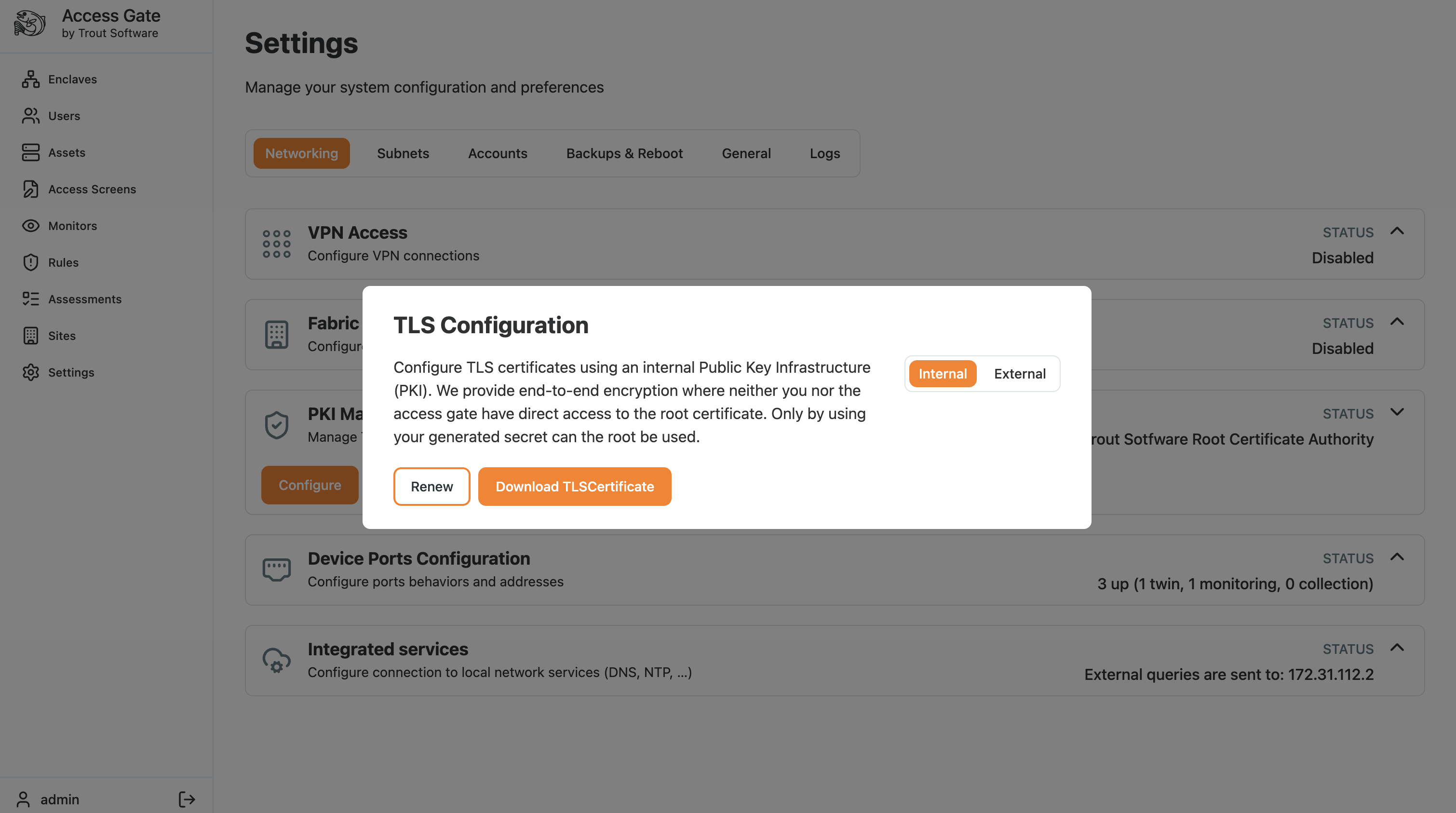
Use this for sites that have no encryption today and want the simplest path: you trust the gate's own root once and the PKI takes care of itself. Ideal for labs, pilots, and self-contained sites.
Option 2: Chain to your own certificate authority
The intermediate option integrates Access Gate with an existing PKI. Instead of being its own root, the gate chains to your organization's certificate authority, so it issues under a trust your estate already recognizes. Access Gate manages the two-level list described above: the intermediate is signed by your CA and never leaves the device, and terminal certificates are generated on the fly from it.
TLS tunnels are enabled in the Settings → Networking page. Click Generate CSR (CSR = certificate signing request) to obtain the signing document, sign it with your root authority, and upload the resulting intermediate certificate with Upload SCA.
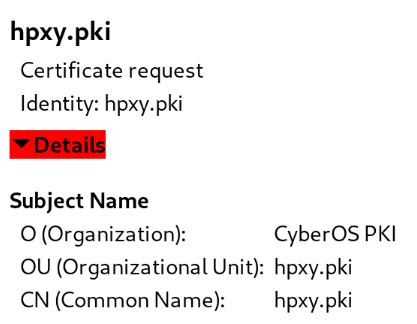
Use this in production and regulated environments where certificates must chain to a corporate or compliance root.
Certificate rotation and lifecycle
The two-level model is what makes rotation manageable:
- Terminal certificates rotate themselves. They are short-lived and minted on demand, so the gate reissues them automatically. There is nothing to renew per asset, which removes the failure mode that causes most certificate outages.
- The intermediate is the one certificate you own. Give it, and the root that signs it, enough validity (a signing root is often valid for around 10 years) and re-sign or renew the intermediate before it expires.
- Watch expiry on the intermediate and the root. An expired signing certificate stops new terminal certificates from issuing, which quietly breaks new tunnels even while existing ones survive.
- Mind the CA settings. The signing CA needs enough path depth to issue an intermediate that in turn issues terminal certificates (depth of at least 2). If you use name or domain constraints on the CA, a good practice, make sure they cover the vnet names the gate will issue for.
For how to require TLS on an enclave once the PKI is in place, see Set up TLS encryption.
Recap
You either used Access Gate's native PKI (download its certificate and trust it on the clients) or chained the gate to your own CA (generate a CSR, sign it with your root, and upload the intermediate). Either way the gate mints terminal certificates on the fly and wraps assets in trusted TLS, so you manage one intermediate instead of a certificate per device.
Reach for this before enforcing TLS on enclaves, when you need trusted certificates across the estate without standing up and hand-maintaining a certificate on every device.