
FTP (File Transfer Protocol) moves files between a client and a server. It is still common in industrial and legacy environments for transferring recipes, firmware, configuration files, and reports. By default it is a plaintext protocol with weak or no authentication, and its use of multiple network ports for data transfer. Access Gate brokers FTP so only the right people and systems reach the server, and, with an access screen, only after they authenticate.
What You Get
When you publish an FTP asset through an enclave, the gate can:
- Authenticate the user first via an access screen before the FTP server is ever reachable.
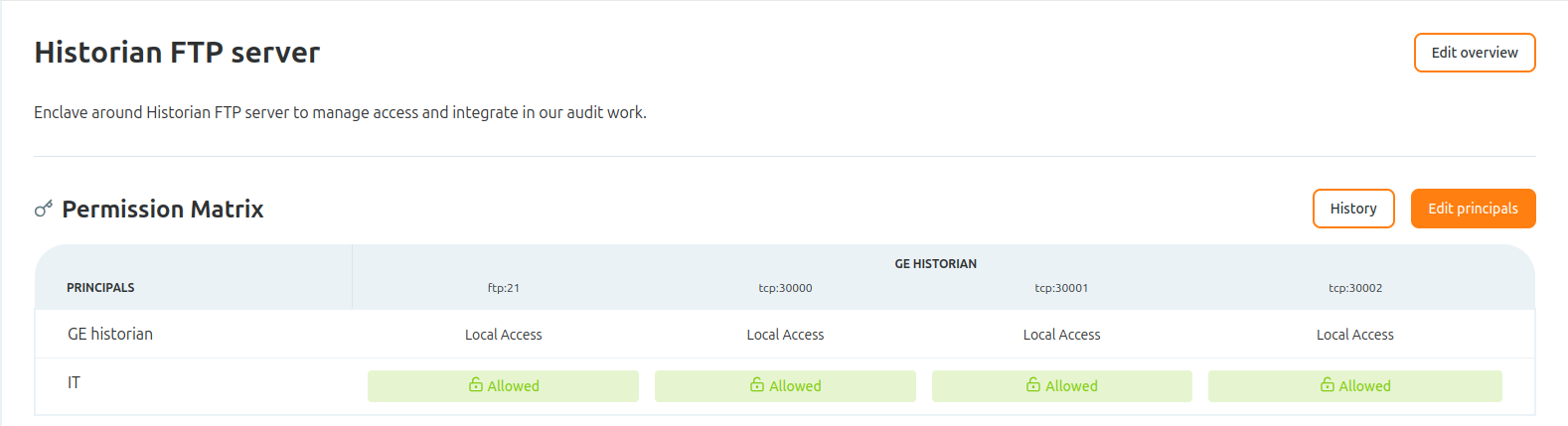
- Scope access by ACL: only the users, groups, or roles you allow reach the server, and only over the ports you grant.
- Handle DNS resolution, authentication, and logging at the gate, so the legacy server stays untouched on its side and every session is recorded.
Set It Up
- Add the FTP server as an asset and define its FTP service.
- Create an enclave and grant access to the user or group that needs it with an
allowrule.
How FTP Uses Ports
FTP is unusual because a single session uses two separate connections:
1. Control connection (port 21), opened by the client first. Commands (USER, PASS, LIST, RETR, STOR) and their replies travel here. This connection stays open for the whole session.
2. Data connection (a second, separate port), opened per transfer (a directory listing, a file upload or download). How that second port is chosen is negotiated, and it depends on the mode:
- Active mode: server to client. The client sends a PORT command telling the server which client port to connect back to.
- Passive mode: client to server. The server replies to PASV with an IP and a port it has opened for this transfer.
Because the data port is dynamic, pin it to a known range so the enclave can allow exactly those ports. With vsftpd, for example, set this in /etc/vsftpd.conf to pin passive mode to a precise 3-port range:
# Passive mode: pin data connection to a precise 3-port range
pasv_enable=YES
pasv_min_port=30000
pasv_max_port=30002
Aligned with a Zero-Trust approach, this hardening configuration is recommended: a tight, known port range lets the gate allow only the ports a transfer needs and nothing more.
Adding Identity
In this case we granted access to the IT group, so a user authenticates through an access screen before the server is reachable. See Authenticate users with access screens.

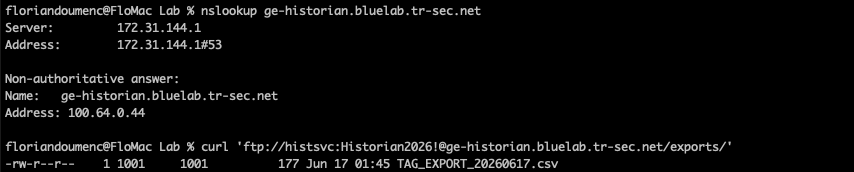
Once the user authenticates, the connection is established, including DNS resolution, user authentication, and logging.
Recap
You brokered an FTP server through an enclave, pinned passive-mode data ports to a known range, and gated access behind identity with an access screen and an ACL.
Reach for this when a site still relies on FTP for file transfer and you need access control, identity, and logging in front of a plaintext, multi-port protocol, without changing the server.