
You change the address one machine talks to, from the real address to its twin address. Its traffic then goes through Access Gate. Nothing else changes on the machine, and setting the address back undoes it.
This moves one machine at a time. The recommended way is one rule on your router, which covers a whole subnet at once. Use this page when you want to test on a single machine first, or when you cannot add that rule.
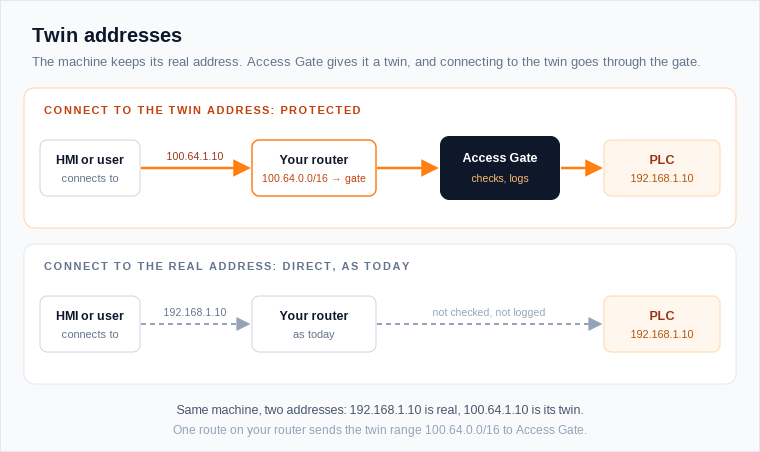
The example
An HMI talks to a PLC. You want that traffic to go through Access Gate.
| What | Real address | Twin address |
|---|---|---|
| HMI (the machine you change) | 10.0.0.4 | |
| PLC (the machine it talks to) | 10.0.0.3 | 100.64.100.3 |
Each twin address keeps the last number of the real address: 10.0.0.3 becomes 100.64.100.3.
1. Find the twin address
Take the real address of the machine being reached (the PLC, 10.0.0.3) and swap the start for its twin range (100.64.100.). The result is 100.64.100.3.
2. Change the address on the machine
On the HMI, find where it stores the PLC's address: its connection settings, its project, or its client configuration. Replace the real address with the twin address:
PLC address on the HMI: 10.0.0.3 -> 100.64.100.3
That is the only change. The HMI keeps its own address, gateway and settings.
3. Check it works
Use the HMI as usual. It should reach the PLC exactly as before.
In the Access Gate console, the flow now appears under the PLC's enclave. Access Gate starts in a dry run: it shows what it would block, and blocks nothing until you approve the rules.
To undo, put 10.0.0.3 back in the HMI's settings.
What happens to the traffic
HMI (10.0.0.4)  [sends to the twin address 100.64.100.3]
  -> Your router  [route 100.64.0.0/16 -> Access Gate]
  -> Access Gate  [checks the enclave, sends it on to the real PLC 10.0.0.3]
  -> PLC (10.0.0.3)
  -> and back the same way to the HMI
Nothing is hidden: anyone who opens the HMI's settings sees exactly where its traffic goes.
When to use another way
- To cover a whole subnet at once, use one rule on your router.
- If people reach the machine by its name, use Protect a machine you reach by its name. The name points to the twin address, and nothing changes on any machine.
- If you cannot change the machine and cannot add a rule on the router, see the advanced options in Choose how to connect your machines.
Other options
Define the twin range
The twin range (the "overlay range") is the set of addresses Access Gate uses as twin addresses, each one mapped one to one to a real address. The default is 100.64.0.0/16, part of the CGNAT reserved range, so it should not clash with your existing addresses. You define it in the Access Gate interface:
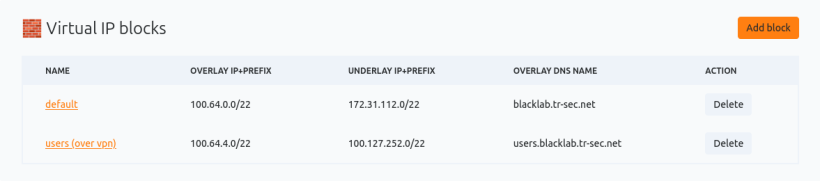
The twin range and the real subnet must be the same size, and they must not overlap. In the example, 100.64.100.0/24 maps to 10.0.0.0/24.
Configure the Secure Twin port
The Secure Twin port is the Access Gate interface that receives traffic sent to twin addresses and passes it on to the real machines. On the settings page, select the port type:
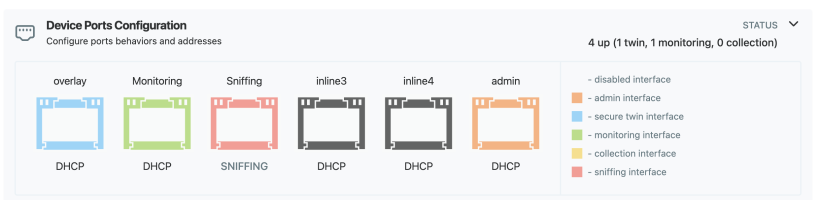
Then enter the interface values for the segment:
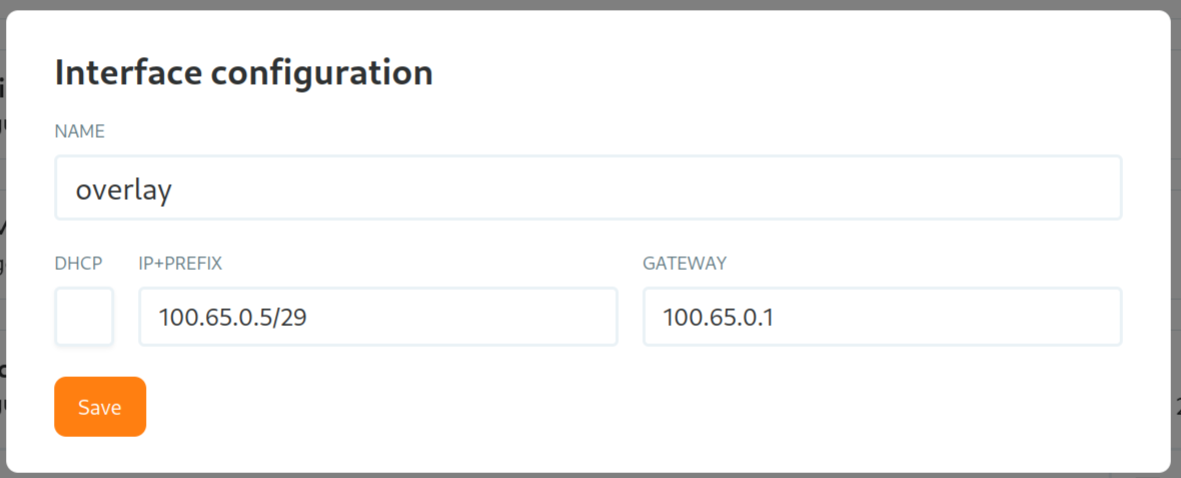
A ping to the interface confirms it is up before you send any traffic to it.
Route only one twin range, on a Linux router
If your router does not yet send twin addresses to Access Gate, add the route. The quick start uses the whole 100.64.0.0/16. To route only the example's range:
ip route add 100.64.100.0/24 via 100.65.0.6
If Access Gate is deployed in-line and already carries your VLANs and trunk, traffic passes through it without this route. See the architecture overview.
How it works, in network terms
Twin IPs is a 1:1 overlay NAT (a "binat"). Access Gate maps the twin address 100.64.100.3 back to the real 10.0.0.3, applies enclave rules, and delivers the traffic. Only the destination the client targets changes, so its own IP, gateway and neighbor logic are untouched, and the PLC is not changed at all.
To confirm the traffic really crossed the gate rather than staying on the local subnet, look at the TTL of the reply: it is lower than for a direct reply.
If you would rather the router do the redirection than change the machine, see Redirect traffic with your router's NAT.