
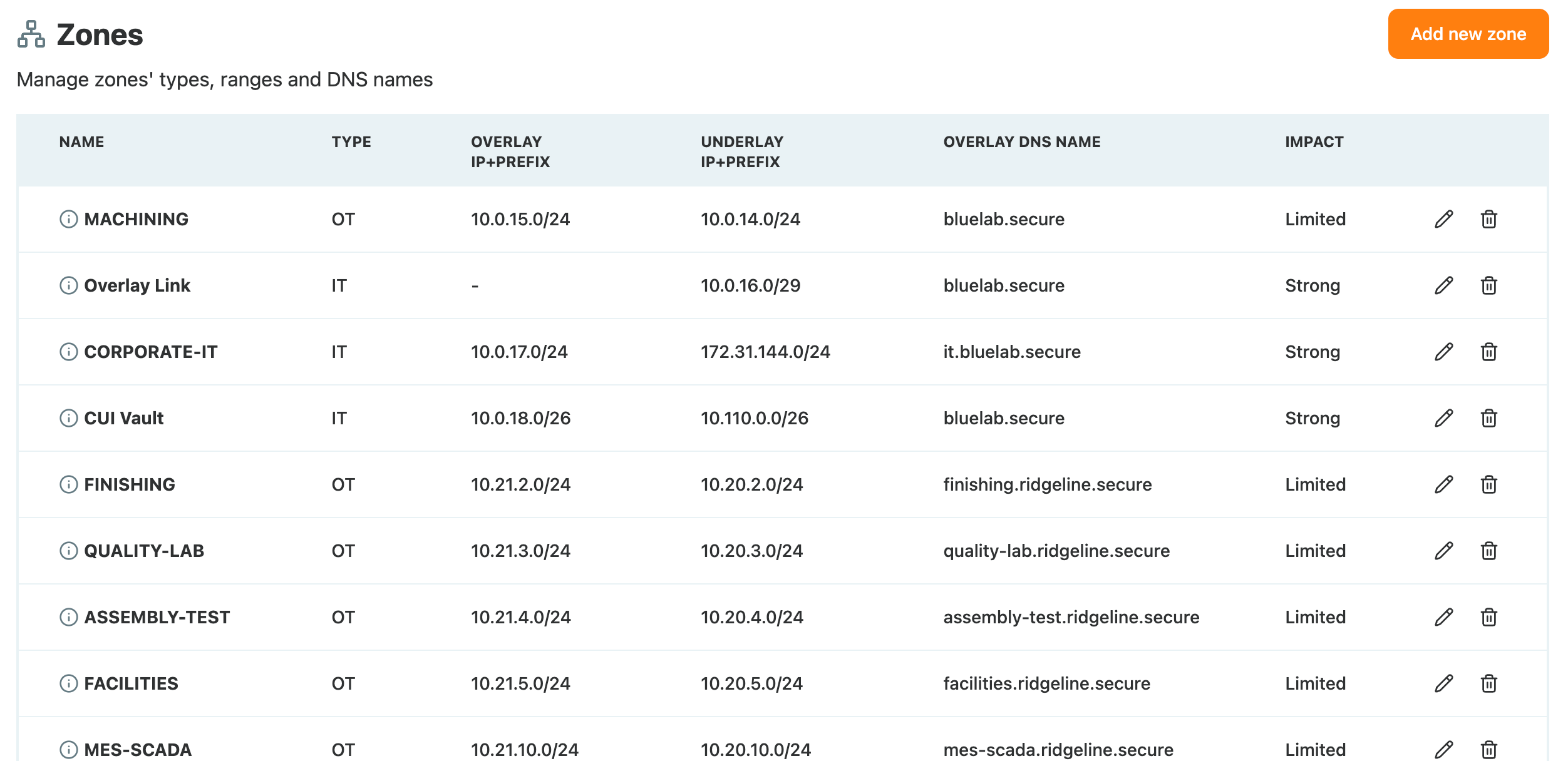
A zone is a named address range that Access Gate knows about: where its machines really are, how they are reached, what kind of network it is, and the DNS name its machines share. You manage zones under Settings > Zones.
Zones are used across Access Gate. Detection raises an alert when traffic crosses a zone boundary it should not, access rules can add a whole zone in one step, every machine gets its DNS name from its zone, and the VPN advertises the zone ranges to remote users.
What a zone holds
| Field | What it means | Example |
|---|---|---|
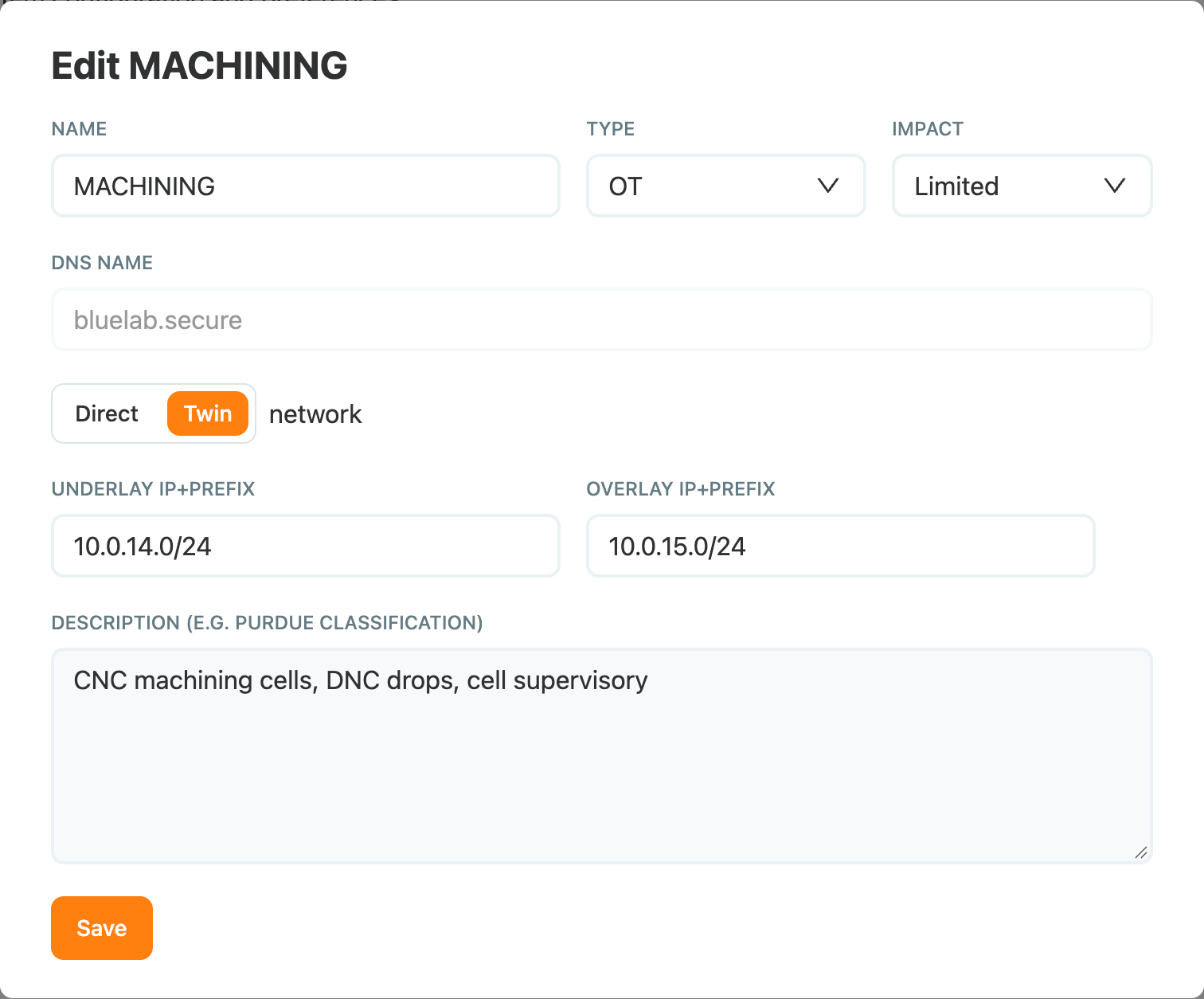
| Name | How the zone shows in Access Gate: access rules, alerts, filters. | MACHINING |
| Type | The kind of network: VPN, IT, OT, Guest, Vendor or Public. | OT |
| Impact | How much an incident in this zone matters: Limited, Moderate, Strong or Critical. | Limited |
| DNS name | The domain shared by every machine of the zone. | bluelab.secure |
| Direct / Twin | Whether machines are reached at their real address only, or also through a twin address. | Twin |
| Underlay IP+Prefix | The range where the machines really are. | 10.0.14.0/24 |
| Overlay IP+Prefix | Twin zones only: the twin range that goes through Access Gate. | 10.0.15.0/24 |
| Description | Free text, for example the Purdue level. | CNC machining cells, DNC drops |
Zones and VLANs
A zone does not hold a VLAN ID. What ties it to a VLAN is the address range: give the zone the subnet of the VLAN as its underlay, and the zone and the VLAN describe the same machines. One zone per VLAN is the usual starting point.
A zone does not have to be a VLAN, though. Any range can be a zone:
- Part of a VLAN. To treat a few machines of a flat network apart, give them their own smaller range. In the example,
CUI Vaultis the/26that holds the machines receiving CUI. - A link network.
Overlay Linkis the/29between Access Gate and the router. - A remote site or a VPN pool. A subnet reached through a router or a tunnel is a zone like any other. When the Tailscale VPN is connected, Access Gate creates the zones for the tailnet itself:
vpn_<pool>for the address pool andts_<subnet>for subnets that other tailnet machines advertise. They have no trash icon, since the VPN manages them.
Direct or Twin
- Direct: machines are reached at their real address. The zone only has an underlay range.
- Twin: each machine also gets a twin address in the overlay range, and traffic sent to the twin address goes through Access Gate on its way to the machine. The twin address keeps the machine's host number: in
MACHINING, the switch at10.0.14.25is reached through Access Gate at10.0.15.25.
Give the overlay range the same size as the underlay, so every machine has a twin. How traffic gets to the twin addresses is covered in Choosing a Secure Twin deployment.
DNS names
The DNS name of a zone is the end of the name of every machine in it. Each machine has its own prefix, set on the asset (Give your machines easy names), and Access Gate puts the two together:
| Machine | Zone | Name | Access Gate answers |
|---|---|---|---|
Switch, 10.0.14.25 | MACHINING (Twin, bluelab.secure) | mc-sw01.bluelab.secure | 10.0.15.25, its twin address |
PLC, 10.20.2.10 | FINISHING (Twin, finishing.ridgeline.secure) | anodize-plc.finishing.ridgeline.secure | 10.21.2.10, its twin address |
Auth server, 10.0.16.6 | Overlay Link (Direct, bluelab.secure) | auth.bluelab.secure | 10.0.16.6, its real address |
So in a Twin zone, people who use the name go through Access Gate without knowing the twin address. You can check any name against Access Gate (here on its interconnect address):
dig @10.0.16.6 mc-sw01.bluelab.secure +short
# 10.0.15.25
Two ways to pick DNS names:
- One domain for the site, shared by several zones (
bluelab.secureabove). Machine names must then be unique across those zones. - One subdomain per zone (
finishing.ridgeline.secure,quality-lab.ridgeline.secure). The name tells where the machine is, and the same prefix can exist in two zones.
For computers to use these names, they must ask Access Gate for them: forward each domain from your company DNS to Access Gate, as in Protect a machine you reach by its name. With the Tailscale VPN, Access Gate publishes the domains to the tailnet as split DNS itself.
Type and impact
The type says what kind of network the zone is, and drives boundary detection:
| Type | Typical members |
|---|---|
VPN | Remote users connected over a VPN |
IT | Office workstations, servers, the business network |
OT | PLCs, HMIs, CNCs, SCADA and MES servers |
Guest | Guest Wi-Fi and temporary access |
Vendor | Vendor and integrator networks |
Public | Networks exposed to or reached from the internet |
The impact ranks the zone in alerts and reports, see Risk Matrix and Subnet Labels. Most OT zones start at Limited, and the zones that hold CUI or safety systems go higher.
Add a zone
- Go to Settings > Zones and select Add new zone.
- Enter the Name, pick the Type and the Impact.
- Enter the DNS name.
- Pick Direct or Twin, and enter the Underlay IP+Prefix, plus the Overlay IP+Prefix for a Twin zone.
- Add a Description if useful, for example the Purdue level.
- Select Save.
To change a zone later, select its pencil icon. Everything but the DNS name can be edited.
Recap
We described the network to Access Gate as zones: a name, a type and an impact, the real range of the machines and, for Twin zones, the twin range that goes through Access Gate. We mapped zones to VLANs through their subnet, and used other ranges where a VLAN did not fit. Each zone got a DNS name, which Access Gate combines with each machine's prefix and answers with the twin address or the real one.
Reach for this when you set up a new site, add a network segment, or want machines reached by name.